<?xml version="1.0" encoding="utf-8"?>
<feed xmlns="http://www.w3.org/2005/Atom">
  <title>Practicing Design</title>
  
  <subtitle>Observations from the field</subtitle>
  <link href="/atom.xml" rel="self"/>
  
  <link href="http://practicing.design/"/>
  <updated>2020-08-11T21:35:04.699Z</updated>
  <id>http://practicing.design/</id>
  
  <author>
    <name>Sarah Hibner</name>
    
  </author>
  
  <generator uri="https://hexo.io/">Hexo</generator>
  
  <entry>
    <title>Book Review of &quot;Graphic Fest, Identities for Festivals &amp; Fairs&quot;</title>
    <link href="http://practicing.design/2020/08/11/book-review-graphic-fest/"/>
    <id>http://practicing.design/2020/08/11/book-review-graphic-fest/</id>
    <published>2020-08-11T19:19:25.000Z</published>
    <updated>2020-08-11T21:35:04.699Z</updated>
    
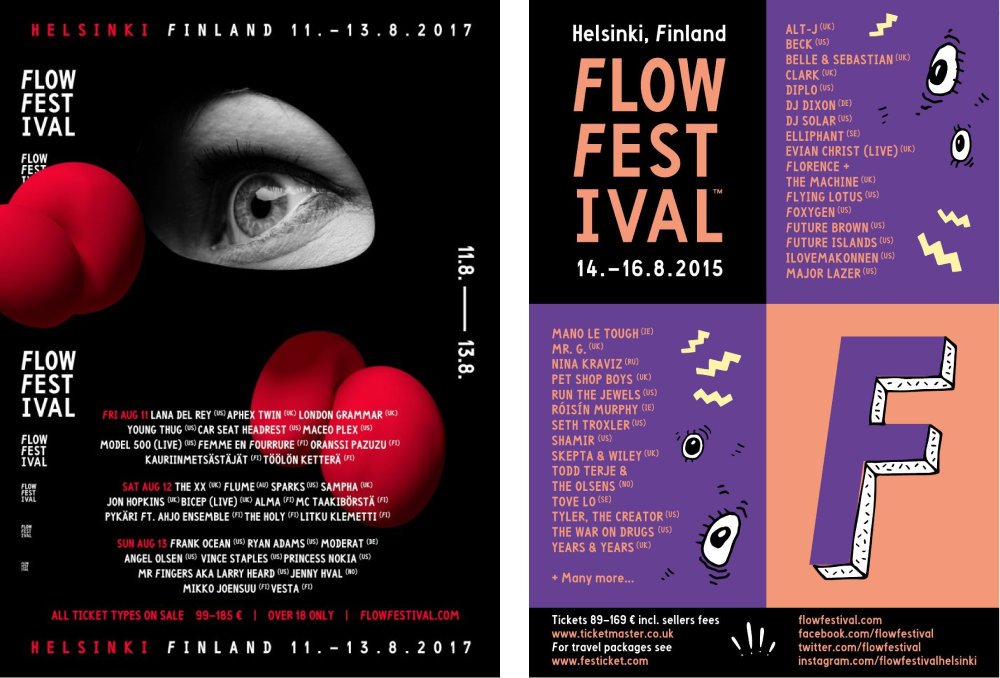
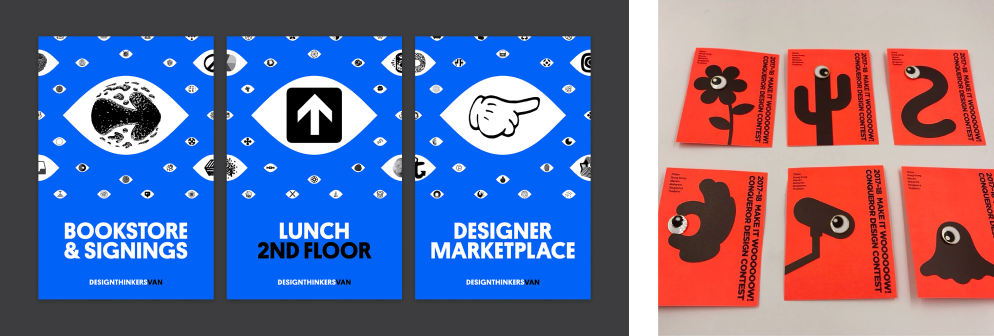
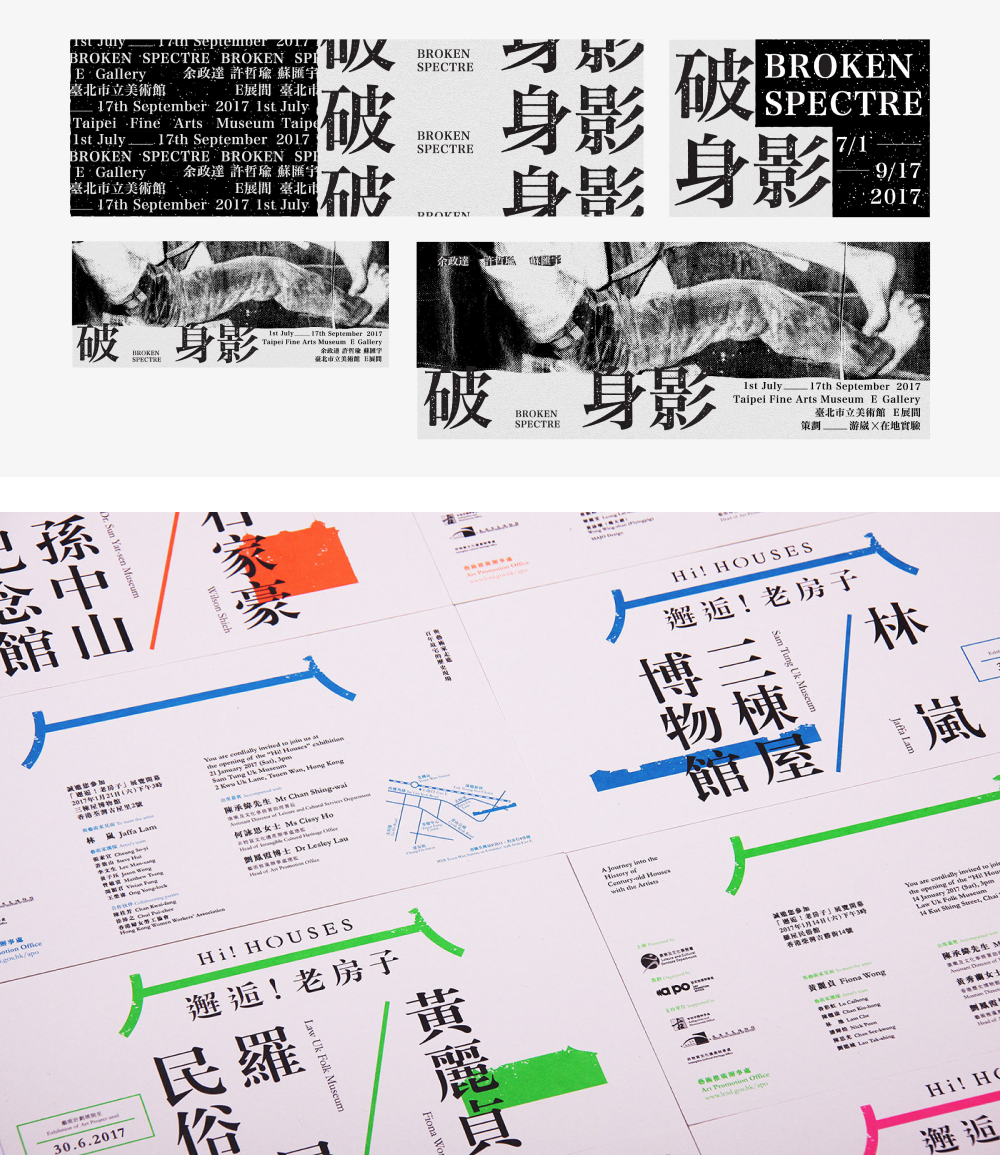
    <content type="html"><![CDATA[<img src="/2020/08/11/book-review-graphic-fest/graphic-fest-book-cover.jpg" class="" title="Graphic Fest book cover"><p><strong>Title:</strong> “Graphic Fest: Spot-on Identity for Festivals and Fairs”</p><p><strong>Author:</strong> Victionary</p><p><strong>Website:</strong> <a href="https://victionary.com/collections/art-design/products/graphic-fest?variant=35147472896162" target="_blank" rel="noopener">on the Victionary website</a></p><h1 id="What’s-this-book-about"><a href="#What’s-this-book-about" class="headerlink" title="What’s this book about?"></a>What’s this book about?</h1><p><a href="https://victionary.com/collections/art-design/products/graphic-fest?variant=35147472896162" target="_blank" rel="noopener">“Graphic Fest”</a> is a colorful exploration of visual design systems that were created specifically for large-scale, in-person events like festivals and exhibitions around the world. The community events featured in this book took place between 2015 and 2018, so as of writing this in 2020, it’s still a relatively current collection of curated environmental design work.</p><p>Overall, 84 unique projects by 66 different designers and design studios are highlighted in this book. These creative personalities are based in cities like Hong Kong, Seoul, Beijing, London, Oslo, Cape Town, Gdańsk, and Thessaloniki, to name a few. The book also features three multi-page interviews with <a href="https://studiofnt.com/" target="_blank" rel="noopener">studio fnt</a> from Seoul, with <a href="https://www.blow.hk/" target="_blank" rel="noopener">BLOW</a> from Hong Kong, and with <a href="https://iscreativestudio.com/" target="_blank" rel="noopener">IS Creative Studio</a> from Madrid. These interviews provide insight into the various thought processes and creative philosophies that inform some of the work on display. </p><h1 id="What-are-my-thoughts-on-this-book"><a href="#What-are-my-thoughts-on-this-book" class="headerlink" title="What are my thoughts on this book?"></a>What are my thoughts on this book?</h1><p>This book focuses mostly on print, exhibit &amp; environmental design—less so on digital applications, although they’re alluded to. This obviously makes sense given the constraints of the print medium, but it would have been better if this book’s website contained further examples of the digital and motion graphic elements that comprised some of these visual identities.</p><p>Having said that, I was pleasantly surprised to find “Graphic Fest” features both the same festival over multiple years (so you can see how the design approach changes every year), and the same studio designing for completely different events (so you can see their breadth). This provides a unique opportunity to compare case studies across a variety of perspectives. </p><p>Take for example <a href="https://bond-agency.com/" target="_blank" rel="noopener">Bond Creative Agency’s</a> work for FLOW Festival both in 2017, as well as in 2015 - 2016. The two projects featured from this multi-year collaboration show how Bond Creative Agency took two very different creative approaches. Each of these approaches encourage notes of intrigue and playfulness through their respective unique visual identities, while relying on very different types of imagery (raster vs vector), as well as color palettes and visual motifs.</p><img src="/2020/08/11/book-review-graphic-fest/flow-festival-bond-agency-comparison-2015-2017.png" class="" title="Comparison of posters designed by Bond Creative Agency for Flow Festival 2015 – 2017"><p><em>Comparison of posters designed by Bond Creative Agency for Flow Festival 2015 – 2017</em></p><p>Along those lines, in terms of visual symbols the recurring visual pattern I noticed most involved eyeballs. I found this intriguing given that eyes <em>are</em> the windows to the soul, and it’s interesting to see how many different ways this visual motif was illustratively interpreted. For example, <a href="https://rethinkcanada.com/" target="_blank" rel="noopener">Rethink</a> used the symbol of an eye as their starting point for Design Thinkers 2017, but then riffed upon that idea and expanded it into a visual language that extends beyond the basic symbolism of the eye. <a href="https://www.blow.hk/" target="_blank" rel="noopener">BLOW</a> did something similar in their work for Conqueror Design Contest 2017, although with a more playful flair.</p><img src="/2020/08/11/book-review-graphic-fest/design-thinkers-conference-compared-with-make-it-wow.png" class="" title="Comparison of posters designed by Rethink for Design Thinkers conference, and Make It Wow design contest collateral designed by Bond Creative Agency in 2017"><p><em>Comparison of posters designed by Rethink for Design Thinkers conference, and Make It Wow design contest collateral designed by Bond Creative Agency in 2017</em></p><p>Despite the breadth of visual styles in this book, one thing I noticed as a point of curiosity was the large number of sans-serif typefaces present in the featured work—both for latin and non-latin typefaces alike. There were still a few examples of display type and serif type in the featured visual identities, but they were definitely the exception.</p><p>This makes me wonder if this is a question of legibility and readability, because festival and environmental design need to be as accessible as possible for their intended audiences? Display typefaces in particular could very quickly become impediments in this respect. Although <a href="https://www.sciencedirect.com/science/article/pii/S0042698905003007" target="_blank" rel="noopener">research</a> on the comparative legibility and readability between serif and sans-serif fonts seems inconclusive, Massimo Vignelli’s work for the New York City subway system helped establish a precedent of sans-serif usage for public communications projects.</p><p>Having said that, despite the suffusion of sans-serif type in this book, I enjoyed the many examples it provided of latin and non-latin typefaces coexisting and interplaying in visual identities with each other, including Chinese, Korean and Japanese typefaces. 2017 projects like the Broken Spectre Exhibition by <a href="https://odotoo.com/" target="_blank" rel="noopener">0.00 Design</a> and Risograph ROOM, as well as the Hi! Houses project by BLOW, and the Totem Run by <a href="http://www.gd-morning.org/" target="_blank" rel="noopener">Good Morning Design</a> are just a few of the examples of this interplay of typefaces that stood out to me from “Graphic Fest.”</p><img src="/2020/08/11/book-review-graphic-fest/asian-typography-examples-graphic-fest.png" class="" title="Posters and event graphics designed by by 0.00 Design and Risograph ROOM for Broken Spectre Exhibition 2017, along with Hi! Houses environmental graphics designed by BLOW in 2017, and Totem Run design system created by Good Morning Design in 2017"><p><em>Posters and event graphics designed by by 0.00 Design and Risograph ROOM for Broken Spectre Exhibition 2017, along with Hi! Houses environmental graphics designed by BLOW in 2017, and Totem Run design system created by Good Morning Design in 2017</em></p><h1 id="Do-I-recommend-this-book"><a href="#Do-I-recommend-this-book" class="headerlink" title="Do I recommend this book?"></a>Do I recommend this book?</h1><p>Overall, I love that this book has exposed me to more visual design work from parts of the world whose creative output I would otherwise find it difficult to find on my own, so yes, I recommend it. Sometimes it can be difficult to know where to start online because there’s so much to sort through, even when it comes to niche areas of design like event and environmental design. Books like “Graphic Fest” provide a shortcut for finding this kind of inspiration in a curated context, and they encourage you to look deeper into these design projects instead of taking them at face value.</p><p>Along those lines, I also enjoy that this book exposed me to various types of cultural events that have taken place around the world. From fashion trade shows, to music and film festivals, to design contests, to photography and art exhibitions, to academic capstone and degree shows, to city-wide library weeks, and so much more—this book reminded me of just how many different types of one-time and recurring public events exist, in need of visual design services. These types of events provide a unique opportunity for creatives to use design as an interface for public discourse.</p><p>The format Victionary chose also helped to highlight the similar community-based needs that arise for events that might otherwise seemed unrelated. Overall, “Graphic Fest” ventures beyond the realm of simple design inspiration by amplifying the public context within which so much design is created.</p>]]></content>
    
    <summary type="html">
    
      My review of &#39;&#39;Graphic Fest,&#39;&#39; a visual design book about festivals and exhibitions by Victionary
    
    </summary>
    
    
      <category term="Design" scheme="http://practicing.design/categories/Design/"/>
    
    
      <category term="Book Review" scheme="http://practicing.design/tags/Book-Review/"/>
    
  </entry>
  
  <entry>
    <title>I made a free meal-planning template in Notion</title>
    <link href="http://practicing.design/2020/07/16/i-made-a-free-meal-planning-template-in-notion/"/>
    <id>http://practicing.design/2020/07/16/i-made-a-free-meal-planning-template-in-notion/</id>
    <published>2020-07-17T05:27:36.000Z</published>
    <updated>2020-07-17T05:43:24.354Z</updated>
    
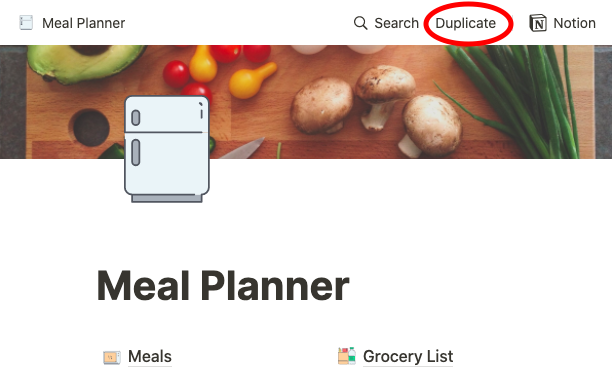
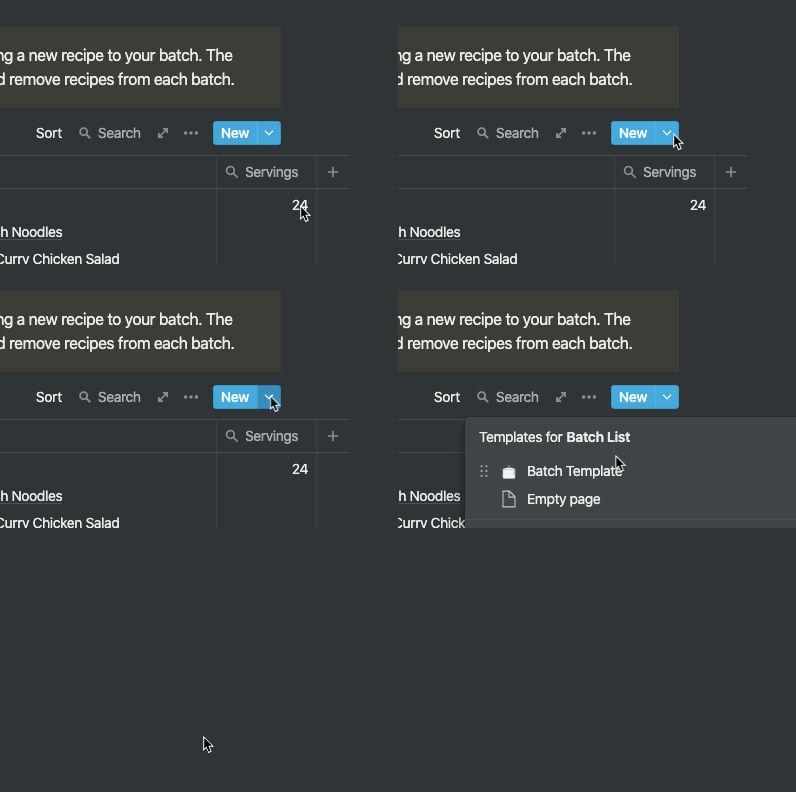
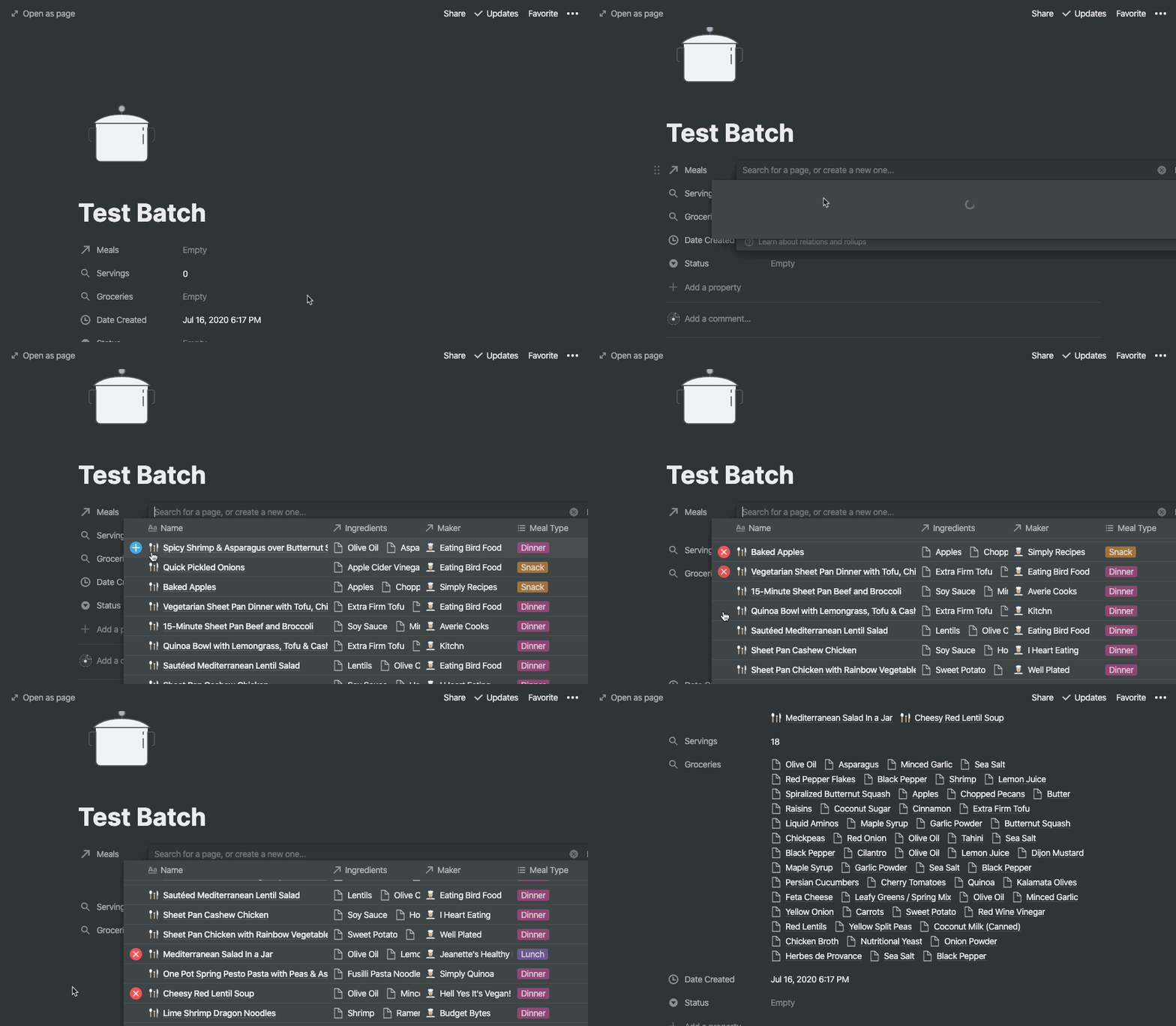
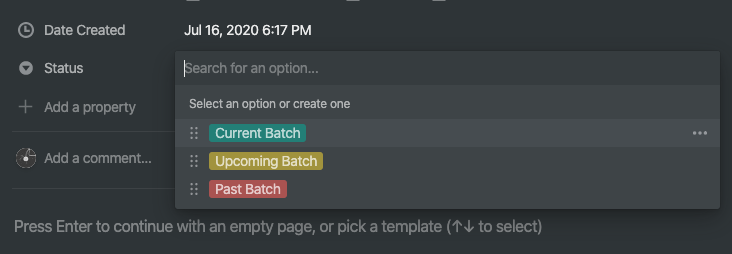
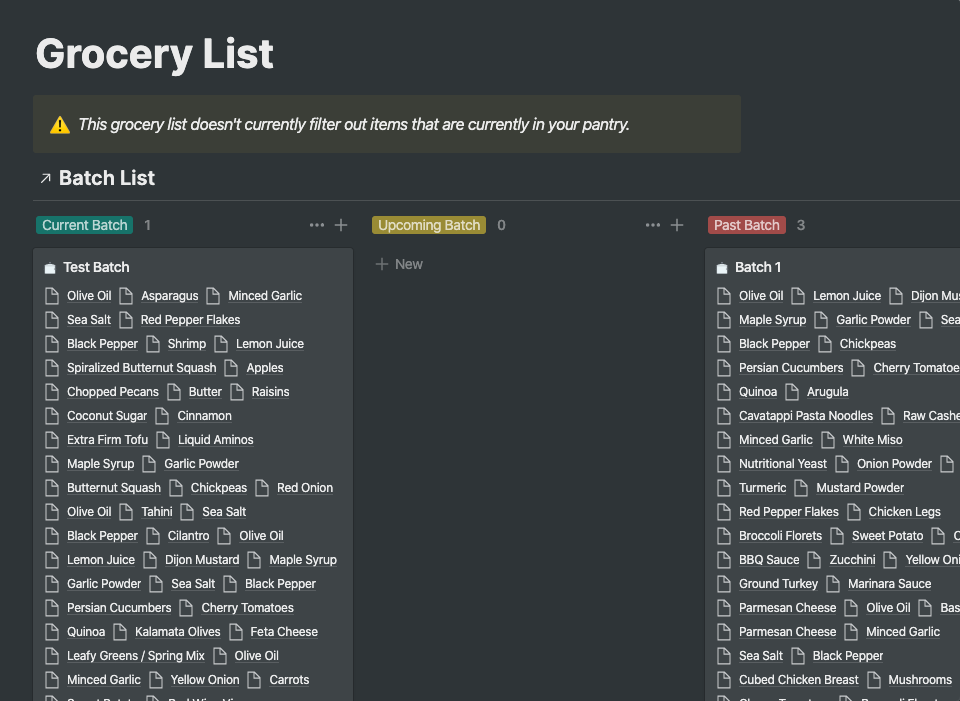
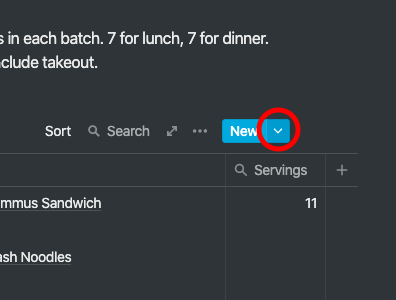
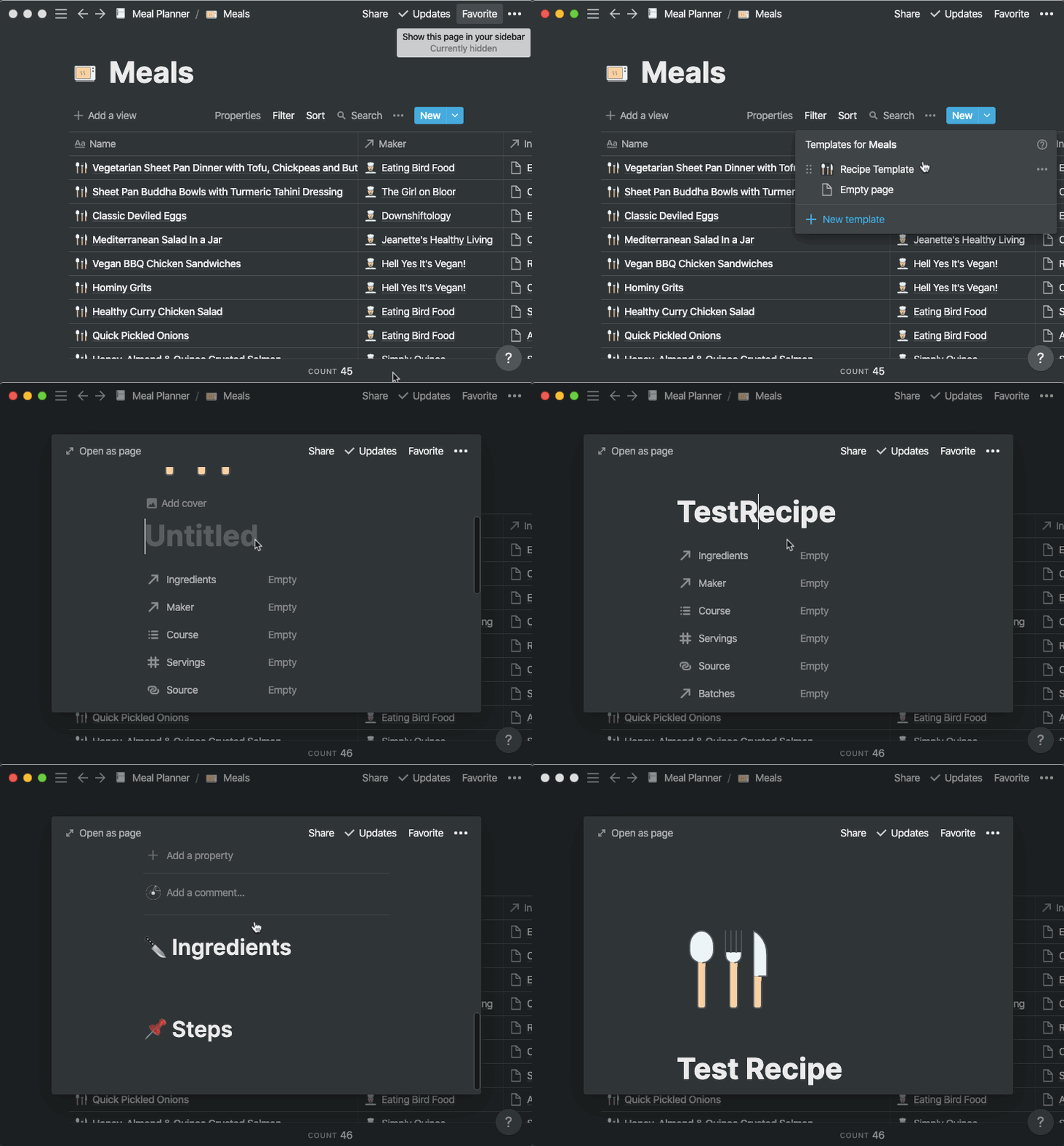
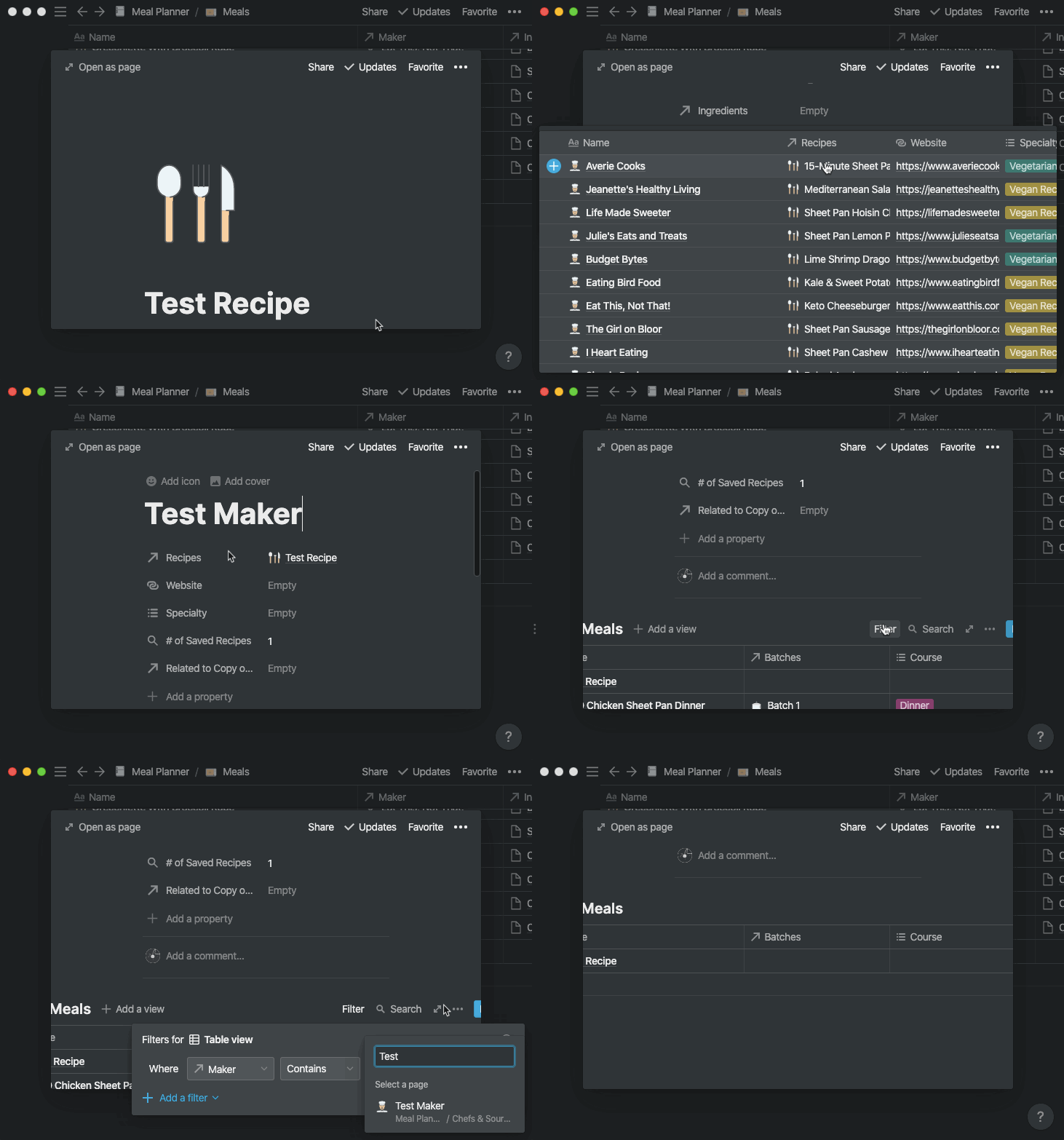
    <content type="html"><![CDATA[<img src="/2020/07/16/i-made-a-free-meal-planning-template-in-notion/dark-or-light-mode.jpg" class="" title="Screenshot of a meal planning template in Notion, showing both light and dark modes"><h1 id="Introduction"><a href="#Introduction" class="headerlink" title="Introduction"></a>Introduction</h1><p>It’s 2020 and I’ve accomplished something I never thought I’d do—I now cook 90% to 100% of my meals every day. After many failed meal prepping attempts, I finally zeroed in on the friction points I was experiencing and built a system that bypassed them instead of getting knotted up by them. What this looks like in practice is a set of relational no-code databases in <a href="http://notion.so/" target="_blank" rel="noopener">Notion</a>. After more than ten weeks, I can confidently say that this system has worked better for me than any other paid or free approaches I’d tried to solve the meal planning conundrum.</p><p>The main friction point I realized kept tripping me up throughout the years was related to the context within which I was planning my meals. Many of the meal planning templates and services I’ve tried online throughout the years organize meal planning within a temporal context. You plan your meals based on days, weeks, and months as your measurable units. My problem is that I don’t stick very well to those units of measurement—especially not while intermittent fasting—and this can lead to food waste. For example, some days I just don’t get around to cooking, or I end up eating leftovers, or I end up ordering takeout, or improvising with leftover ingredients.</p><p>Most recently, I tried <a href="http://platejoy.com/" target="_blank" rel="noopener">PlateJoy</a> as a paid meal planning service, but I kept running into this time conundrum. PlateJoy is a service that is very rigidly structured within a week-centric, time-based constraint, and this often led to recipe backups for me while I was using the service. Depending on your predispositions in the kitchen, this may not be a problem for you, but I’m cooking for one and a recipe backup can quickly become an issue.</p><p>So how can you apply the solution I created to your own meal planning journey? Keep reading if you’d like to learn how to duplicate my meal planning template so you can try it for yourself using Notion. This post summarizes the <a href="https://www.notion.so/How-to-Use-this-Template-f1a7d44b1023477982120a3d4b17c21e" target="_blank" rel="noopener">tutorial</a> you can also find in the footer of the template.</p><h1 id="How-to-access-this-template"><a href="#How-to-access-this-template" class="headerlink" title="How to access this template"></a>How to access this template</h1><p>Template URL: <a href="https://www.notion.so/Meal-Planner-12d3d4145ba4428b8f85500579bba4e2" target="_blank" rel="noopener">https://www.notion.so/Meal-Planner-12d3d4145ba4428b8f85500579bba4e2</a></p><p>Tutorial URL: <a href="https://www.notion.so/How-to-Use-this-Template-f1a7d44b1023477982120a3d4b17c21e" target="_blank" rel="noopener">https://www.notion.so/How-to-Use-this-Template-f1a7d44b1023477982120a3d4b17c21e</a></p><h1 id="Getting-started"><a href="#Getting-started" class="headerlink" title="Getting started"></a>Getting started</h1><p>If you’re new to Notion, make sure you’ve created a new free or unpaid account first. This template is compatible with free workspaces and paid workspaces alike. Once you’re logged into your Notion account, navigate to <a href="https://www.notion.so/Meal-Planner-12d3d4145ba4428b8f85500579bba4e2" target="_blank" rel="noopener">the meal planning template</a> and click the ‘Duplicate’ button on the top right of the page to copy the template into your own Notion workspace. Once it’s in your workspace you’ll be able to edit and modify it to your heart’s content.</p><img src="/2020/07/16/i-made-a-free-meal-planning-template-in-notion/meal-planner-notion-1.png" class="" title="Close-up Screenshot of meal planning template in Notion highlighting the Duplicate link"><h2 id="Meal-planning-based-on-number-of-servings"><a href="#Meal-planning-based-on-number-of-servings" class="headerlink" title="Meal planning based on number of servings"></a>Meal planning based on number of servings</h2><p>This meal template uses a <strong>servings-based approach</strong> to meal planning, as opposed to a time-constrained approach. A servings-based approach to meal planning makes it easier to buy groceries, and helps minimize food waste. </p><p>When you use timeframes to organize our batches of meals, you may organize your meals around one or two week increments, for example. For some people this may work great, but for others a time-based approach may be too inflexible.</p><p>Using serving sizes to organize batches of meals lets you focus on the number of servings you’d like to cook within a given batch. This servings-based approach is especially useful if you have a non-traditional meal schedule, e.g. if you’re intermittent fasting or if you tend to be less strict about when you cook throughout the week.</p><h1 id="Step-1-Decide-on-number-of-servings-amp-create-a-new-batch"><a href="#Step-1-Decide-on-number-of-servings-amp-create-a-new-batch" class="headerlink" title="Step 1: Decide on number of servings &amp; create a new batch"></a>Step 1: Decide on number of servings &amp; create a new batch</h1><p>First, decide on the number of servings you want to cook in your first batch of meals. Depending on your type of diet and the number of people you’re cooking for, your number of servings will usually translate to number of meals. In my case, I plan for two meals a day because I practice intermittent fasting.</p><p>Once you know your number of servings, navigate to the ‘Batches’ page and click on the dropdown arrow next to the blue ‘New’ button. Click on ‘Batch Template’ option in the dropdown menu. This will create a new page for your first batch based on a template that contains everything you need to get started.</p><img src="/2020/07/16/i-made-a-free-meal-planning-template-in-notion/meal-planner-notion-2.gif" class="" title="GIF showing how to create a new batch in this meal planning template in Notion"><h1 id="Step-2-Add-meals-to-your-new-batch"><a href="#Step-2-Add-meals-to-your-new-batch" class="headerlink" title="Step 2: Add meals to your new batch"></a>Step 2: Add meals to your new batch</h1><p>This meal planning template comes with 45 recipes that range between vegan, vegetarian, and meat meals that have been bookmarked from various online chef bloggers. All information has been input manually, including recipe information, ingredient information, and chef/creator information. I’ve included a few breakfast recipes, and a handful of snack recipes, but the vast majority of these recipes are for lunch and dinner. Many of these are ideal for bulk meal prep as well. </p><p>Click within the ‘Meals’ field to start browsing available recipes. Click on the plus sign that appears when you hover over a recipe to add it to your current batch. As you add recipes to your batch, the ingredients and number of servings will automatically be updated in the batch’s ‘Ingredients’ and ‘Servings’ fields.</p><img src="/2020/07/16/i-made-a-free-meal-planning-template-in-notion/meal-planner-notion-3.gif" class="" title="GIF showing how to add meals to your new batch in this meal planning template in Notion"><h1 id="Step-3-Mark-the-status-of-your-batch-as-‘Current’"><a href="#Step-3-Mark-the-status-of-your-batch-as-‘Current’" class="headerlink" title="Step 3: Mark the status of your batch as ‘Current’"></a>Step 3: Mark the status of your batch as ‘Current’</h1><p>Remember to set the status of your new batch to ‘Current’. This status is what the Grocery List relies upon to tell you what your grocery list looks like for the batch in question. This template comes with three self-explanatory statuses, ‘Current’, ‘Past’, and ‘Upcoming’. </p><img src="/2020/07/16/i-made-a-free-meal-planning-template-in-notion/meal-planner-notion-4.png" class="" title="Screenshot showing the three batch status options in this meal planning template in Notion"><h1 id="Step-4-View-your-grocery-list"><a href="#Step-4-View-your-grocery-list" class="headerlink" title="Step 4: View your grocery list!"></a>Step 4: View your grocery list!</h1><p>Navigate from the batches page to the grocery list page. If your batch statuses are up to date, then the list of the ingredients you’ll need for this batch should be listed under the ‘Current Batches’ column of the Grocery List kanban board, and all your past batches should be listed under the ‘Past Batches’ column. You can also plan for upcoming grocery lists with the ‘Upcoming Batch’ status.</p><p>I order my groceries online, so I usually just go down this list and add the items to my shopping cart. One of the downsides to this system is that there doesn’t seem to be an easy way to export this shopping list. This may be more of a problem for you if you physically go to the grocery store, because you won’t be able to check items off in this view in Notion. Still, it creates a pretty succinct list of exactly what you’ll need for your upcoming set of meals, which is something I’ve found extremely valuable.</p><img src="/2020/07/16/i-made-a-free-meal-planning-template-in-notion/meal-planner-notion-5.png" class="" title="Screenshot showing what the automatically generated grocery list looks like in this meal planning template in Notion"><h1 id="Step-5-Add-your-own-favorite-recipes-optional"><a href="#Step-5-Add-your-own-favorite-recipes-optional" class="headerlink" title="Step 5: Add your own favorite recipes (optional)"></a>Step 5: Add your own favorite recipes (optional)</h1><p>You may want to customize or add to the recipes included in this template. You can do this on the ‘Meals’ page, where you can indicate whether the recipe contains meat or dairy, its number of serving, source, maker, and more!</p><img src="/2020/07/16/i-made-a-free-meal-planning-template-in-notion/meal-planner-notion-6.png" class="" title="Screenshot showing where to add new meals in this meal planning template in Notion"><img src="/2020/07/16/i-made-a-free-meal-planning-template-in-notion/meal-planner-notion-7.gif" class="" title="GIF showing how to add new meals to this meal planning template in Notion"><h1 id="Step-6-Add-your-favorite-chefs-optional"><a href="#Step-6-Add-your-favorite-chefs-optional" class="headerlink" title="Step 6: Add your favorite chefs (optional)"></a>Step 6: Add your favorite chefs (optional)</h1><p>When you add a new recipe to this template, if its creator isn’t currently in your database, you’re give the option to add them while you’re adding a new recipe. While this creates a placeholder for that chef, it doesn’t automatically create a templated page for them in your database. If you’d like to create a page for them, just navigate to the ‘Chefs’ page, and click on the chef in question. An empty page will appear, and if you scroll towards the bottom of this page and click ‘Chef Template’, this page will be populated with its page template.</p><img src="/2020/07/16/i-made-a-free-meal-planning-template-in-notion/meal-planner-notion-8.gif" class="" title="GIF showing how to add new chefs and creators to this meal planning template in Notion"><h1 id="Conclusion"><a href="#Conclusion" class="headerlink" title="Conclusion"></a>Conclusion</h1><p>This meal planning system won’t be for everyone, but it may appeal to some people who’ve tried a few other meal planning solutions with no luck. It’s not really that huge of a change from a time-based meal planning system, but for me the switch in thinking to servings-based has just clicked a lot more easily when it comes to plotting it all out—especially when it comes to ordering groceries.</p><p>If you happen to find this template useful, let me know on <a href="https://twitter.com/practicing_dsgn" target="_blank" rel="noopener">Twitter</a> or send me an <a href="mailto:info@sarah-hibner.com">email</a>. I’d love to hear how you used or modified this template to suit your needs!</p>]]></content>
    
    <summary type="html">
    
      I made a free servings-based meal-planning template in Notionn
    
    </summary>
    
    
      <category term="Productivity" scheme="http://practicing.design/categories/Productivity/"/>
    
    
      <category term="Notion" scheme="http://practicing.design/tags/Notion/"/>
    
      <category term="Template" scheme="http://practicing.design/tags/Template/"/>
    
  </entry>
  
  <entry>
    <title>My review of Hexo, a Node-powered static site generator</title>
    <link href="http://practicing.design/2020/05/02/my-review-of-hexo-a-node-powered-static-site-generator/"/>
    <id>http://practicing.design/2020/05/02/my-review-of-hexo-a-node-powered-static-site-generator/</id>
    <published>2020-05-02T23:04:30.000Z</published>
    <updated>2020-06-28T22:20:37.947Z</updated>
    
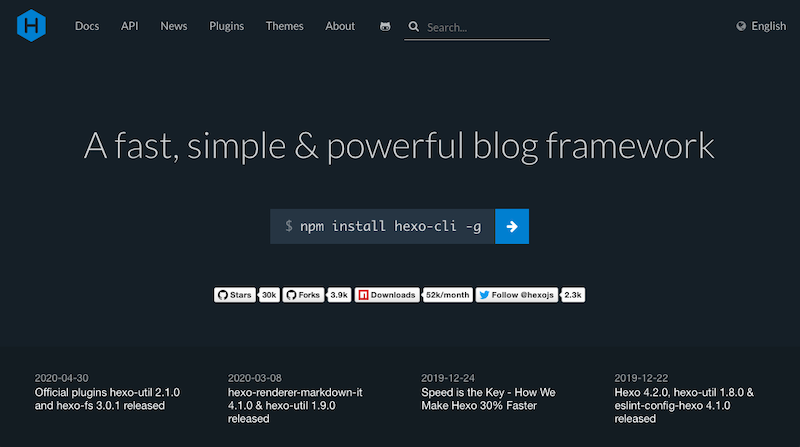
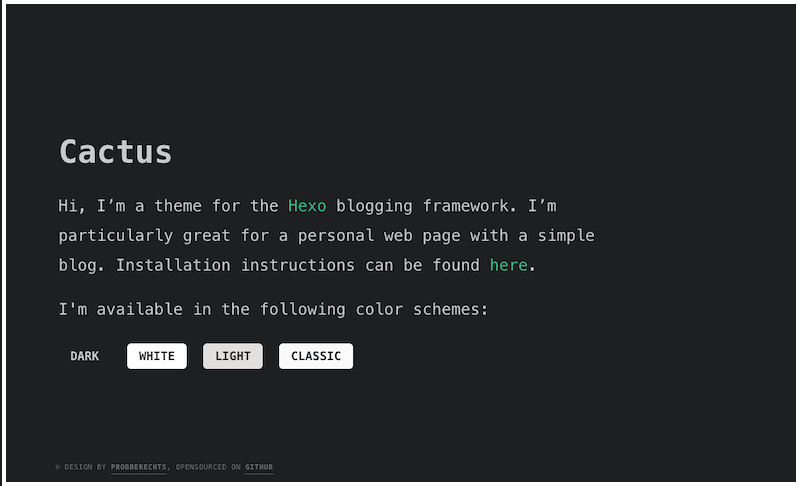
    <content type="html"><![CDATA[<p>I’ve been wanting to experiment with static site generation for awhile now, and after researching a few options, I decided to go with the <a href="https://hexo.io/" target="_blank" rel="noopener">Hexo framework</a> — mainly because of the number and quality of themes available for it. Hexo is a free to use Node-powered static blog generator that was originally launched by Tommy Chen in 2012, and it seems to still be going strong 8 years later.</p><p>I’ve been using Hexo on this site for around three months now, and I’ve published five or six posts in that period, so I’ve had enough time to play around with the framework in depth. I’m a designer whose knowledge of web development is spotty at best — indeed, the gaps are probably wider than the filled areas. I don’t consider myself a developer (yet), but this project was a testament to the fact that I can figure things out with enough Googling and intuition. Turns out that I’d need both of those things pretty much immediately upon trying to install Hexo, but that wasn’t necessarily Hexo’s fault. </p><p>This walkthrough is meant to summarize the steps I took to get Hexo up and running, as well as highlight some of the errors I encountered, along with how I went about solving them. It’s written for beginner developers or non-developers who may not understand what to do when troubleshooting their own instances of Hexo.</p><img src="/2020/05/02/my-review-of-hexo-a-node-powered-static-site-generator/hexo-homepage.png" class="" title="Hexo homepage"><h1 id="Make-sure-you-have-the-right-version-of-Node-js-installed-in-the-right-directory"><a href="#Make-sure-you-have-the-right-version-of-Node-js-installed-in-the-right-directory" class="headerlink" title="Make sure you have the right version of Node.js installed in the right directory"></a>Make sure you have the right version of Node.js installed in the right directory</h1><p>Given the fact that Hexo is powered by Node, it stands to reason that you would want to make sure you have Node installed on your machine (I’m using a Mac). If you’re like me, you might have installed Node awhile ago without having to touch it much, and you may not initially realize that you can have multiple versions of Node installed in different directories (especially <a href="https://github.com/hexojs/hexo/issues/3348" target="_blank" rel="noopener">if Yarn or other package control comes into play</a>).</p><p>That’s essentially what I ran into when I ran <code>npm install -g hexo-cli</code> only to get my first of many error messages:</p><figure class="highlight jsx"><table><tr><td class="gutter"><pre><span class="line">1</span><br><span class="line">2</span><br><span class="line">3</span><br></pre></td><td class="code"><pre><span class="line">/usr/lib/node_modules/hexo-cli/node_modules/chokidar/index.js:<span class="number">150</span> <span class="keyword">async</span> remove(item) &#123; ^^^^^^</span><br><span class="line"></span><br><span class="line"><span class="built_in">SyntaxError</span>: Unexpected identifier at createScript (vm.js:<span class="number">56</span>:<span class="number">10</span>) at <span class="built_in">Object</span>.runInThisContext (vm.js:<span class="number">97</span>:<span class="number">10</span>) at Module._compile (<span class="built_in">module</span>.js:<span class="number">549</span>:<span class="number">28</span>) at <span class="built_in">Object</span>.Module._extensions..js (<span class="built_in">module</span>.js:<span class="number">586</span>:<span class="number">10</span>) at Module.load (<span class="built_in">module</span>.js:<span class="number">494</span>:<span class="number">32</span>) at tryModuleLoad (<span class="built_in">module</span>.js:<span class="number">453</span>:<span class="number">12</span>) at <span class="built_in">Function</span>.Module._load (<span class="built_in">module</span>.js:<span class="number">445</span>:<span class="number">3</span>) at Module.require (<span class="built_in">module</span>.js:<span class="number">504</span>:<span class="number">17</span>) at <span class="built_in">require</span> (internal/<span class="built_in">module</span>.js:<span class="number">20</span>:<span class="number">19</span>) at <span class="built_in">Object</span>.&lt;anonymous&gt; (<span class="regexp">/usr/</span>lib/node_modules/hexo-cli/node_modules/hexo-fs/lib/fs.js:<span class="number">6</span>:<span class="number">18</span>) at Module._compile (<span class="built_in">module</span>.js:<span class="number">577</span>:<span class="number">32</span>) at <span class="built_in">Object</span>.Module._extensions..js (<span class="built_in">module</span>.js:<span class="number">586</span>:<span class="number">10</span>) at Module.load (<span class="built_in">module</span>.js:<span class="number">494</span>:<span class="number">32</span>) at tryModuleLoad (<span class="built_in">module</span>.js:<span class="number">453</span>:<span class="number">12</span>) at <span class="built_in">Function</span>.Module._load (<span class="built_in">module</span>.js:<span class="number">445</span>:<span class="number">3</span>) at Module.require (<span class="built_in">module</span>.js:<span class="number">504</span>:<span class="number">17</span>)</span><br></pre></td></tr></table></figure><p>Internet research led me to a few tangentially related StackOverflow questions in English, as well as a bunch of directly-related questions in Chinese. Thankfully, Google Translate helped me see that <a href="https://gis90.github.io/articles/10512/" target="_blank" rel="noopener">a few</a> different <a href="https://issuehunt.io/r/hexojs/hexo/issues/3781" target="_blank" rel="noopener">people</a> had the same issue as me, and it was due to a Node version that was out of date, and thus incompatible with Hexo.</p><p>I proceeded to update Node, but the old version was still being referenced in my project directory for some reason. I then tried reinstalling Node with Homebrew, but that didn’t work either, so I once again turned to Google. It turns out <a href="https://stackoverflow.com/questions/43218630/node-using-wrong-version-after-brew-install" target="_blank" rel="noopener">someone else</a> had similar problems with Homebrew + Node in certain situations, so I tried what they did and uninstalled Node altogether to get a fresh start. </p><p>Based on the advice from that StackOverflow thread, I used NVM (Node Version Manager) to install Node this time. This is where the next two road blocks came up – first I had to fix two bash issues to get NVM installed at all. To be fair, this was more a <em>me</em> problem than a Hexo problem. </p><p>Terminal had been prompting me to update from bash to zsh because “the default interactive shell is now zsh” (I don’t actually have any idea what bash or zsh are), and I mistakenly made that update while I was in the midst of my Hexo set-up. This of course caused even more issues to crop up. It didn’t take an internet search to figure out that changing to zsh from bash caused my new road blocks. Instead of trying to make zsh work, I decided to just revert back to bash.</p><p>After solving that problem, and scrambling to solve a secondary bash profile issue, I was finally able to install NVM and then use it to re-install Node, which thankfully solved the weird version inconsistencies. Finally, finally, <code>npm install -g hexo-cli</code> worked the way it was supposed to!</p><h1 id="Beware-special-characters-when-using-YAML-amp-markdown-to-write-posts"><a href="#Beware-special-characters-when-using-YAML-amp-markdown-to-write-posts" class="headerlink" title="Beware special characters when using YAML &amp; markdown to write posts"></a>Beware special characters when using YAML &amp; markdown to write posts</h1><p>Hexo’s blog post format combines a YAML front-matter area containing post meta-data, and a markdown section below it within which to write the body of the post. Coming into this project, I had lots of experience working with markdown, and had previously worked with YAML front matter on Dev.to’s posting platform. Thankfully, it was pretty straightforward to apply that knowledge in this capacity, with one glaring exception – apostrophes a.k.a. single quotes.</p><p>It’s an easy thing to get tripped up by if you’re not paying attention, and honestly I should have known better given the havoc special typographic characters are known to wreak in other languages. The need to escape apostrophes in YAML didn’t occur to me until I’d just about started banging my head against the desk trying to figure out why I kept getting errors similar to these when I tried to use <code>hexo generate</code> to generate a static site from my first blog post:</p><figure class="highlight jsx"><table><tr><td class="gutter"><pre><span class="line">1</span><br></pre></td><td class="code"><pre><span class="line">YAMLException: can not read a block mapping entry; a multiline key may not be an implicit key</span><br></pre></td></tr></table></figure><figure class="highlight jsx"><table><tr><td class="gutter"><pre><span class="line">1</span><br></pre></td><td class="code"><pre><span class="line"><span class="string">"hexo"</span> FATAL can not read a block mapping entry; a multiline key may not be an implicit key at line <span class="number">9</span>, column <span class="number">9</span>:</span><br></pre></td></tr></table></figure><p>Although Hexo’s <a href="https://hexo.io/docs/troubleshooting#YAML-Parsing-Error" target="_blank" rel="noopener">docs</a> mention troubleshooting YAML parsing errors, they cover the use of soft tabs and adding a space after colons, but they don’t really touch upon special characters as a possible source of bugs too. And the <a href="https://yaml.org/spec/1.2/spec.html" target="_blank" rel="noopener">YAML spec</a> that Hexo’s docs link to, while obviously comprehensive, is overwhelming when trying to debug an issue like this one. </p><p>Thanks to even more helpful <a href="https://chrischen0405.github.io/2018/11/21/post20181121-2/" target="_blank" rel="noopener">internet research</a>, it turns out I’d been using an unescaped single quote in one of my post titles. Before I realized the root of my problem was single quotes, I’d been looking at everything from hidden non-English characters, to trailing spaces as possible sources of my road blocks. </p><p>Even better, after all that frustration, all it took was adding one more single quote next to the original single quote to fix the problem. It’s a lesson I learned at least once more when I carelessly added an unescaped single quote to my blog description in the <code>_config.yml</code> file, which is where most if not all of the global site settings are stored.</p><p>I found <a href="https://docs.octoprint.org/en/master/configuration/yaml.html" target="_blank" rel="noopener">this primer</a> on YAML by OctoPrint to be helpful in summarizing some of the common pitfall areas that people encounter in these scenarios – because it turns out there are a variety of ways <a href="https://github.com/hexojs/hexo-migrator-rss/issues/10" target="_blank" rel="noopener">people</a> can <a href="https://github.com/hexojs/hexo/issues/2386" target="_blank" rel="noopener">get</a> tripped <a href="https://blog.csdn.net/zyupupup/article/details/85098366" target="_blank" rel="noopener">up</a> by syntax despite YAML’s seeming simplicity. </p><h1 id="Hexo-themes-extend-customizability-beyond-just-styling"><a href="#Hexo-themes-extend-customizability-beyond-just-styling" class="headerlink" title="Hexo themes extend customizability beyond just styling"></a>Hexo themes extend customizability beyond just styling</h1><p>The main selling point that convinced me to go with Hexo compared to other static site generators was the number of promising themes its robust community has provided over the years. I chose Pieter Robberechts’s <a href="https://github.com/probberechts/hexo-theme-cactus" target="_blank" rel="noopener">Cactus theme</a> because it aligns with the vision I have for this site, and because it has great documentation. Something I was also pleasantly surprised by was the way themes like Cactus can extend Hexo’s features without the need to install individual plugins. </p><img src="/2020/05/02/my-review-of-hexo-a-node-powered-static-site-generator/cactus-theme-homepage.png" class="" title="Cactus Theme homepage"><p>With Cactus, I’m able to easily switch between light and dark color scheme variations, change my code highlighting scheme, add a projects list to my site, and a lot more. Some of these are features that I probably could have added to Hexo via individual plugins, but it’s so much nicer to have them all in one theme/place with clear documentation and thoughtful integration.</p><p>One point of frustration I <em>have</em> experienced with Cactus, and which I would have experienced with <em>any</em> theme I’d chosen to go with, is going beyond its built-in customizability. Full disclosure: This is because of my lack of domain knowledge, and not a fault of the theme nor the framework. </p><p>A case in point here is table styling. I decided I wanted to change the way my tables are styled in Cactus theme, but am not super knowledgeable on compiling CSS and basically just hacked together a plain CSS solution. I know it was the wrong way to have done it, but considering how much time I’ve spent troubleshooting just to get to this point with Hexo, I decided the trade-off of time spent figuring it out wouldn’t have been worth it to me at that moment in time. I know I may come to regret that decision later on, but I’ll cross that bridge when I get to it.</p><h1 id="Conclusion-Hexo’s-worth-it-so-far"><a href="#Conclusion-Hexo’s-worth-it-so-far" class="headerlink" title="Conclusion: Hexo’s worth it so far"></a>Conclusion: Hexo’s worth it so far</h1><p>Despite the copious amount of roadblocks I had to get through first, three months after first starting to use it I’d say I’m happy with Hexo overall. I really like the workflow I’ve developed with it, even though I’m still manually deploying the site at the end of it because I couldn’t get deployment to work and was sick of debugging one of three personal sites I currently maintain. The convenience of being able to continue writing my posts in markdown while being able to produce static, interconnected HTML pages of those posts with a single <code>hexo generate</code> command has made a lot of the headaches worth it.</p><p>Also, I’d like to note that I’ve had mixed results with plugins so far, but I’ll have to explore their capabilities and results a little more before I give any definitive opinion on them. The one bad plugin experience I’ve had so far was with the <code>hexo-image-caption</code> plugin by Wayou – I just wasn’t able to get it to work. A good plugin experience I had was with the Google Analytics add-on to Cactus theme.</p><p>I’d hesitate to recommend Hexo to everyone, but I will say that it might be a good fit for you if you’re looking for a markdown-based, Node-powered static site generator for a blog. If your development knowledge is non-existent or entry-level, then it might also help if you’re a very curious and patient person who’s convinced every problem is a knot that can be unravelled. If you have any questions or feedback about my experiences with Hexo so far or about your own experiences with it, <a href="mailto:info@practicing.design">let me know</a>!</p>]]></content>
    
    <summary type="html">
    
      A designer&#39;&#39;s review of the Node-based Hexo framework for static site generation
    
    </summary>
    
    
      <category term="Development" scheme="http://practicing.design/categories/Development/"/>
    
    
      <category term="Tools" scheme="http://practicing.design/tags/Tools/"/>
    
  </entry>
  
  <entry>
    <title>Figma Plugin Review: VisualEyes</title>
    <link href="http://practicing.design/2020/04/23/figma-plugin-review-visualeyes/"/>
    <id>http://practicing.design/2020/04/23/figma-plugin-review-visualeyes/</id>
    <published>2020-04-23T19:28:23.000Z</published>
    <updated>2020-06-28T22:20:25.025Z</updated>
    
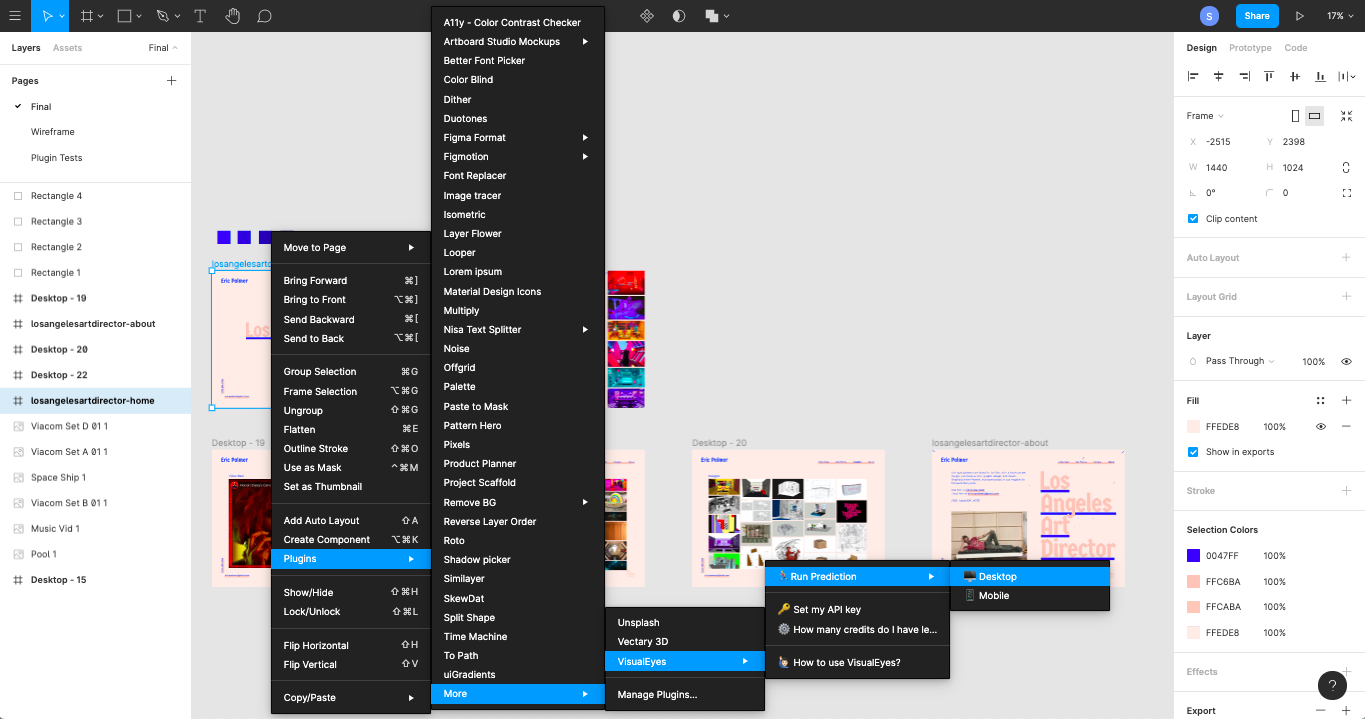
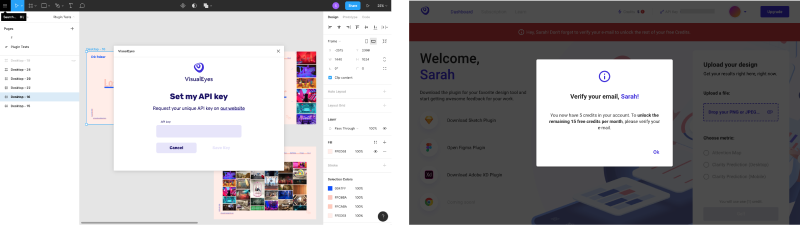
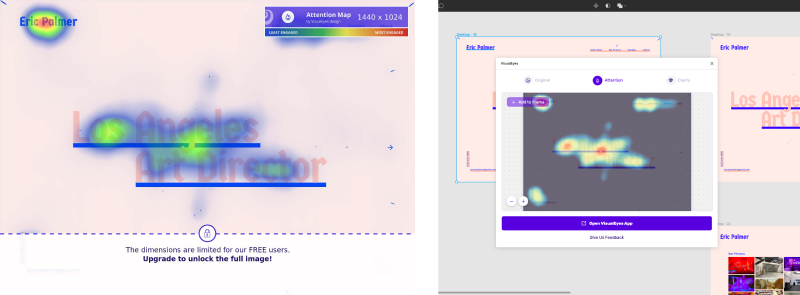
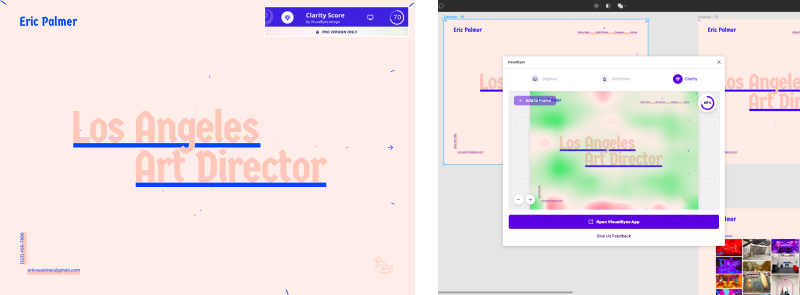
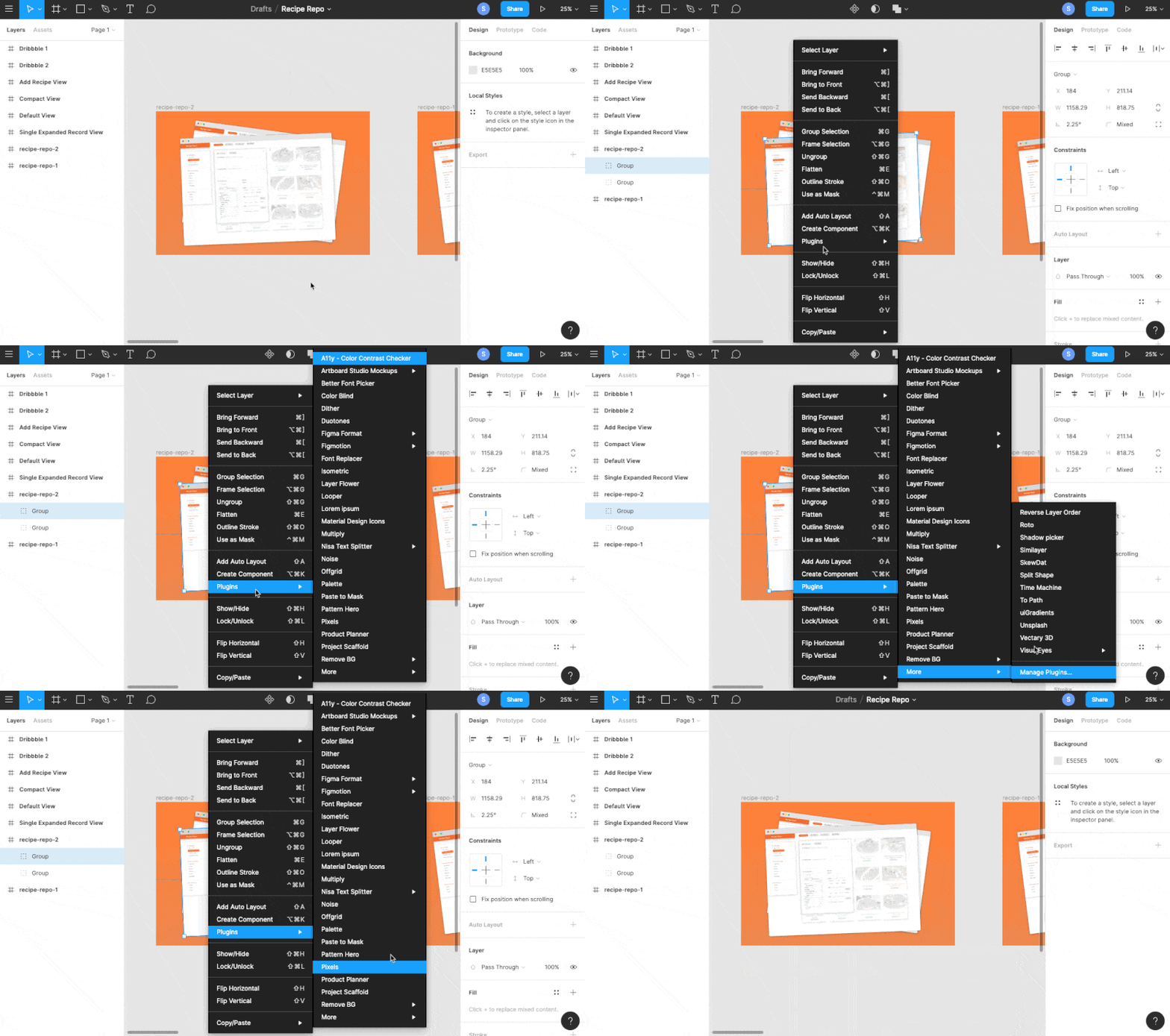
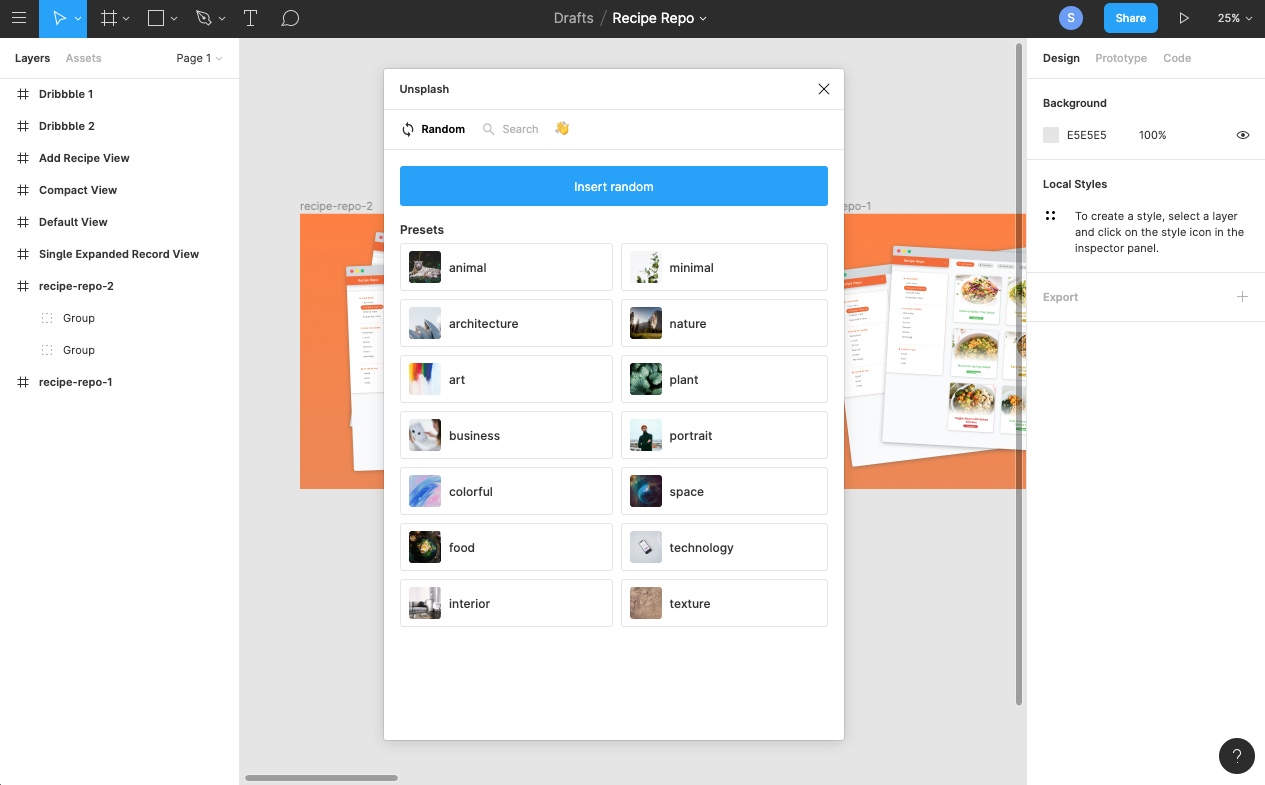
    <content type="html"><![CDATA[<img src="/2020/04/23/figma-plugin-review-visualeyes/1-visualeyes-figma-plugin-page.png" class="" title="The VisualEyes Figma plugin page"><p><strong>Plugin Name:</strong> VisualEyes</p><p><strong>Creator:</strong> Jim Raptis</p><p><strong>Cost:</strong> Free-ish (for now?)</p><p><strong>Docs:</strong> Yes</p><p><strong>Rating:</strong> 4 / 5</p><hr><h1 id="Introduction"><a href="#Introduction" class="headerlink" title="Introduction"></a>Introduction</h1><p>The second Figma plugin I’m evaluating in this series is VisualEyes. On its <a href="https://www.figma.com/c/plugin/740542057689267294/VisualEyes" target="_blank" rel="noopener">Figma plugin page</a>, this plugin’s description reads, “Get rich insights about your designs in a click,” and, “Embrace data-driven design in your workflow. Understand how users look in your prototypes and how clear and aesthetically pleasing are your designs.”</p><p>I first heard about VisualEyes through Thomas, the CEO of the two companies where I work as a creative director and senior designer respectively. He’s really good about finding and sharing useful new digital tools in a wide range of disciplines, and enjoys hearing our feedback after giving these tools a test run. When I came across VisualEyes via organic social media a few weeks after he mentioned it, I decided to stop procrastinating and give it a try.</p><p>Aside from HotJar and CrazyEgg, I don’t have much experience with attention heatmaps in my design workflow, but I’ve been interested in exploring and integrating more data-driven design practices into what I do. Despite the seeming common sense nature of the insights that tools like attention heatmaps provide, they can provide an outside perspective on your designs that might help you refine your compositions when you can no longer look at them objectively.</p><p>When I first wrote this review a few months ago, it was from the perspective of a free user whose first interactions with the VisualEyes product were happening through Figma’s plugin interface. However in the past month, VisualEyes has made their Basic paid plan free for all users, so I’ll be revising my review to take that into account, since it means more of the plugin’s features will now be available to try for no extra charge until further notice.</p><h1 id="Menus-Upon-Menus"><a href="#Menus-Upon-Menus" class="headerlink" title="Menus Upon Menus!"></a>Menus Upon Menus!</h1><img src="/2020/04/23/figma-plugin-review-visualeyes/2-figma-right-click-plugin-menu.png" class="" title="This is the number of right-click menus you have to navigate"><p>My first point of friction while using this plugin has more to do with Figma’s plugin UI than anything else. I had to navigate through four floating menus before I was able to access the VisualEyes plugin options. This floating menu behavior is determined by your screen height, so if I’d had a taller browser window or a larger device, I may have been able to eliminate a few of those steps. Still, more than one or two menu interactions seems like a bit much to get started. It also doesn’t help that this plugin’s name starts with the letter ‘V’, which puts it at the bottom of my list of installed plugins.</p><p>This perfect storm of circumstances means that using this plugin might quickly become tedious if I need to access often it via the plugins menu for whatever reason. Granted, that use case seems unlikely given the limited amount of options VisualEyes has, but still, you never know.</p><h1 id="This-Plugin-Requires-an-API-Key"><a href="#This-Plugin-Requires-an-API-Key" class="headerlink" title="This Plugin Requires an API Key"></a>This Plugin Requires an API Key</h1><img src="/2020/04/23/figma-plugin-review-visualeyes/3-api-info.png" class="" title="These are the API-related prompts you&#39;ll get while using this plugin"><p>It’s worth a heads up that this plugin’s functionality requires an API key. You would think that the menu item clearly stating <em>‘🔑 Set my API key’</em> would have been indication enough for me, but alas I had tunnel vision and had to learn from my mistakes. However, it wasn’t difficult to get an API key from VisualEyes. I signed up for an account, verified my email, and was able to copy my API key and go on my merry way in a matter of minutes. I say this in case anyone is intimidated in general by Figma plugins that require API keys – it was very straightforward to find the necessary API key on VisualEyes’ website after logging in.</p><img src="/2020/04/23/figma-plugin-review-visualeyes/4-pricing-policy-change.png" class="" title="This is the email about a pricing change that VisualEyes recently sent out"><p>When I originally began to write my review for VisualEyes a few months ago, the experience was frustrating for me as a new user giving it a first try because a lot of its functionality seemed to be hidden behind a paywall. My frustration has gone away now that VisualEyes is offering a Basic plan free for all users for the next few months. This means I can now explore the full extent of the plugin without first having to pay $30. I’m including my past experiences as a free user along with my current experience as a free user so you can see how they compare.</p><p>When I first used VisualEyes’ free account, the API key didn’t do much for you if you didn’t already have a paid monthly or yearly subscription to VisualEyes. Although you got 20 credits to start with after signing up for a VisualEyes account and verifying your email, those 20 credits were only good for what were essentially previews of the various paid services that VisualEyes offers. It was a disappointing road block to come that far only to find that my free account didn’t do as much as I expected it to.</p><h1 id="Scoring-Reports-Have-Improved-Considerably"><a href="#Scoring-Reports-Have-Improved-Considerably" class="headerlink" title="Scoring Reports Have Improved Considerably"></a>Scoring Reports Have Improved Considerably</h1><p>It’s been awhile since I gave VisualEyes a try that first time, and now that I’ve revisited it I can see that there’s been a lot of improvement. When I first used the VisualEyes plugin in Figma a few months ago, one of my biggest issues with the plugin was the invasive quality of its scoring. In both the attention heatmap and clarity prediction cases, the rectangle containing the test score obscured the main navigation of my design. There didn’t seem to be any way to reposition this score box before or after running the tests, which meant that some of the test data was inaccessible. As a user who placed my main navigation menu in the top right corner of my composition (an extremely common web pattern by now), the test’s results report detracted from the value the plugin might have otherwise provided to me.</p><p>That reporting experience is much improved in the latest iteration of VisualEyes’ Figma plugin, especially because the plugin now operates within a persistent plugin window as you can see in the screenshots below. This means that results are presented in a much less invasive way than before. This also provides a cleaner opportunity to present additional useful information that would have otherwise cluttered the design of the results presentation, as was the case in VisualEyes’ first iteration in Figma when no persistent plugin window was being used.</p><p>These improvements overall speak to the attentiveness of this plugin’s developers. Beyond the work they’ve obviously done to improve the VisualEyes user experience in general, my before and after screenshot comparisons show just how much though they’ve put into Figma’s plugin experience in particular.</p><h2 id="Attention-Heatmap-Scoring-Review"><a href="#Attention-Heatmap-Scoring-Review" class="headerlink" title="Attention Heatmap Scoring Review"></a>Attention Heatmap Scoring Review</h2><img src="/2020/04/23/figma-plugin-review-visualeyes/5-attention-heatmap-score.png" class="" title="A visual comparison of VisualEyes&#39; old vs new attention map score reporting"><p>On the left, we have VisualEyes’ old method of reporting for attention heatmap scoring. On the right, we have VisualEyes’ new, less invasive method of reporting for attention heatmap scoring in a persistent plugin window.</p><p>Overall, I found VisualEyes’ attention heatmap scoring to be a useful way to visually qualify layout-related design recommendations, although some might say that these score results border on common sense at best, or glorified AI lip service at worst. Say what you will about AI tools like this, but there’s definitely a time and place for them depending on the kind of designer you are and the kind of work environment you’re in. This is especially true on teams that value a data-driven, iterative approach to design.</p><p>I used a website that I recently designed and built for my friend Eric as my test subject, mainly because it’s one of the more recent personal web design projects I’ve worked on. The attention heatmap score helped me accept that the arrow functionality I introduced on the right-hand side of the home page might as well be invisible – something I’d been in denial about until that point. This is the context in which I think I’d generally find this tool useful, at the micro-level, helping to iron out the finer design details.</p><h2 id="Clarity-Scoring-Review"><a href="#Clarity-Scoring-Review" class="headerlink" title="Clarity Scoring Review"></a>Clarity Scoring Review</h2><img src="/2020/04/23/figma-plugin-review-visualeyes/6-clarity-score.png" class="" title="A visual comparison of VisualEyes&#39; old vs new clarity score reporting"><p>On the left, we have VisualEyes’ old method of reporting for clarity scoring. On the right, we have VisualEyes’ new, less invasive method of reporting for clarity scoring in a persistent plugin window.</p><p>At first I was confused by the clarity prediction scoring that VisualEyes offers, mainly because of its potential for ambiguity. Even after having read the docs on <a href="https://www.notion.so/How-to-interpret-Clarity-Score-and-Maps-1831412bfd6d44ac9df4488913b20889" target="_blank" rel="noopener">interpreting Clarity Scores</a>, I’m not sure how a spectrum of ‘Cluttered’ to ‘Clear’ translates into a design clarity score, given that it relies on content density without much seeming regard for content hierarchy or information architecture, much less copywriting. Having said that, I still think that this tool could be useful for those designers who want a second opinion about their layout or content density decisions at a purely aesthetic level.</p><p>The ambiguity of this test could be improved with a better label like ‘Visual Clarity Score’ to qualify the scope of the reporting. It could also be improved if the docs further explained which aesthetic elements and factors are being taken into account when the VisualEyes tool conducts its scoring. As of writing this post, the docs on clarity scores still reflect the previous form of reporting, so this would actually be a good time to update the language explaining the test’s focus on aesthetic clarity.</p><p>Having said that, the VisualEyes team definitely knows that they can’t please everyone, as they mention in their docs: “We cannot eliminate every red area of our designs when we have to deliver some insights to our users and convey a message to them. You need to find a fine line between the score you want to achieve and the context you include in your designs.”</p><h1 id="So-What-Could-Make-this-Plugin-Better"><a href="#So-What-Could-Make-this-Plugin-Better" class="headerlink" title="So What Could Make this Plugin Better?"></a>So What Could Make this Plugin Better?</h1><p>My biggest suggestion for how the VisualEyes Figma plugin could improve has to do with the right-click menu UX friction I mentioned at the beginning of this post. Giving users the option to re-run another heatmap or clarity test from within the persistent plugin window, instead of them having to do it via the right-click menu (which involves multiple clicks), would greatly reduce the interaction cost of using VisualEyes in Figma.</p><p>Specifically, adding the ability to re-run a test from the score report interface would also make this plugin much easier to use in iterative design workflows where it may become tedious having to click three or four times to re-run a test after you’ve made a change in the design to improve a previous score.</p><h1 id="Conclusion"><a href="#Conclusion" class="headerlink" title="Conclusion"></a>Conclusion</h1><p>The value that you get out of VisualEyes’ attention heatmap scoring and clarity scoring will obviously depend on a combination of factors – YMMV. Beginner designers, iterative designers, and data-driven designers are the three types I might expect to find VisualEyes most useful in general, although intermediate and experienced designers might still occasionally find the plugin useful when refining details in their compositions.</p><p>Overall I’m glad I gave this plugin a try, and I can definitely see myself using it every now and then, more for my professional projects than my personal ones. I can see myself using it both in UX research projects for activities like content audits and competitor landscape analyses, as well as in visual design projects.</p><p>I hope this plugin review showed you what it’s like to use the VisualEyes plugin in Figma, including some of its strengths and potential points of frustration for users. If you have any additional questions about this or any of my other plugin reviews, feel free to reach out to me on <a href="https://twitter.com/practicing_dsgn" target="_blank" rel="noopener">Twitter</a> or via <a href="mailto:info@practicing.design">email</a>!</p>]]></content>
    
    <summary type="html">
    
      A designer&#39;&#39;s review of the VisualEyes plugin for Figma
    
    </summary>
    
    
      <category term="Design" scheme="http://practicing.design/categories/Design/"/>
    
    
      <category term="Figma" scheme="http://practicing.design/tags/Figma/"/>
    
      <category term="Tools" scheme="http://practicing.design/tags/Tools/"/>
    
  </entry>
  
  <entry>
    <title>What to listen to while working from home</title>
    <link href="http://practicing.design/2020/04/13/what-to-listen-to-while-working-from-home/"/>
    <id>http://practicing.design/2020/04/13/what-to-listen-to-while-working-from-home/</id>
    <published>2020-04-13T16:34:28.000Z</published>
    <updated>2020-06-28T22:14:22.575Z</updated>
    
    <content type="html"><![CDATA[<p>If you’re in the mood to listen to something while working or hanging out at home, but find that your favorite music, audiobooks, etc. just aren’t striking the right chord, then consider soundscapes and ambient noise as an alternative. Ambient noise isn’t a particularly <em>new</em> solution to the <em>‘I want something playing in the background that isn’t distracting’</em> dilemma. What <em>is</em> new is your breadth of choice, including the combination of audio and visual media. </p><p>One of the nice things about listening to ambient soundscapes as background noise is that most ambient sounds are made to play for long periods of time. In fact, you can use ambient noise as a timer by choosing a format that allows you to set a fixed duration á la Pomodoro. You can easily set windows of time that last anywhere from half an hour all the way up to 10 or more hours depending on your needs by finding ambient Youtube videos of your desired length. The 8-hour long ambient mixes can be a nice way to time your workday in the background when you’re working from home.</p><p>Alternatively, there are plenty of infinitely loopable soundscape options if you’d rather just set it and forget it until you’re ready to stop listening – whenever that may be. The nice thing about finding ambient atmospheres on YouTube is you have the option to set them to loop indefinitely. Although it takes an extra step, by looping your favorite ambient soundscape on YouTube, you don’t have to worry about the amount of time you’ll spend listening to it. </p><p>Beyond the time aspect, the ambient soundscapes I’ve encountered online mostly fall into these two general categories:</p><ul><li>Pre-made sounds &amp; soundscapes</li><li>Customizable sounds &amp; soundscapes</li></ul><h2 id="A-Word-of-Warning"><a href="#A-Word-of-Warning" class="headerlink" title="A Word of Warning"></a>A Word of Warning</h2><p>If you do happen to set an ambient atmosphere to loop on YouTube, it may eventually pause automatically to ask whether you’re still watching. This has happened to me both on my computer as well as on my TV, but it usually takes a few hours.</p><hr><h1 id="Customizable-Sounds-amp-Soundscapes"><a href="#Customizable-Sounds-amp-Soundscapes" class="headerlink" title="Customizable Sounds &amp; Soundscapes"></a>Customizable Sounds &amp; Soundscapes</h1><p>This category spans the breadth of everything from simple customizability on one end of the spectrum, to very detailed controls on the other end of it. By customizability, I mean the ability to change the individual sounds that comprise your soundscape. This lets you adjust everything to your exact specifications.</p><p>For example, if you’re listening to a soundscape of a café during a storm, then a customizable version will let you change the volume of elements like the rain, the fireplace, the wind, the people talking in the background, etc. More advanced versions will even let you control things like wether each sound element is louder in your left or right ear.</p><p>While figuring out what your ambient tastes are, you might encounter sounds that irk or distract you. This is where customizable ambient noise set-ups provide a lot of value because they let you control how different sounds stand out as they interact within a soundscape. </p><p>If you disagree with the default mix of sounds, you can change them to your heart’s content if the soundscape is customizable. Depending on the degree of control the creator provides, you can create highly customized aural atmospheres that suit your preferences and state of mind.</p><p>Here are some of the customizable ambient noise and soundscape mixers I’ve found online – they’re all over the spectrum of customizability.</p><h2 id="Customizable-Ambient-Soundscapes-on-the-Web"><a href="#Customizable-Ambient-Soundscapes-on-the-Web" class="headerlink" title="Customizable Ambient Soundscapes on the Web"></a>Customizable Ambient Soundscapes on the Web</h2><table><thead><tr><th align="left">Link</th><th align="left">Description</th></tr></thead><tbody><tr><td align="left"><a href="https://www.ambient-mixer.com/" target="_blank" rel="noopener">Ambient Mixer</a></td><td align="left">My all-time favorite source of ambient sound, this website provies relatively advanced customization options, although Aura takes the cake in that regard. What I like most is the number of community-submitted pop culture soundscapes available to choose from</td></tr><tr><td align="left"><a href="https://imisstheoffice.eu/" target="_blank" rel="noopener">I Miss the Office</a></td><td align="left">This beautifully designed, customizable office noise simulator was recommended by my co-worker. For those of you who miss being in an office environment, this soundscape generator lets you build your soundscape with a variety of common office product sounds, and even lets you set the number of people murmuring in the background.</td></tr><tr><td align="left"><a href="https://asoftmurmur.com/" target="_blank" rel="noopener">A Soft Murmur</a></td><td align="left">This minimal website lets you choose and combine between 10 free sounds, and 13 premium sounds that range from natural soundscapes to urban settings</td></tr><tr><td align="left"><a href="https://www.noisli.com/" target="_blank" rel="noopener">Noisli</a></td><td align="left">The free version of this app comes with 16 sounds that can be streamed for up to 15 hours per day. Its playlist, timer, and text editor options are definite differentiators</td></tr><tr><td align="left"><a href="https://noises.online/" target="_blank" rel="noopener">Noises Online</a></td><td align="left">Combine and choose between 30 different soundscape elements to create your perfect ambient atmosphere</td></tr><tr><td align="left"><a href="http://rainyscope.com/" target="_blank" rel="noopener">Rainyscope</a></td><td align="left">Although this website only provides 6 different sounds to choose from, the way it visually recreates raindrops on glass makes it worth a try</td></tr><tr><td align="left"><a href="https://mynoise.net/" target="_blank" rel="noopener">MyNoise</a></td><td align="left">If you’re looking for a soundscape repository with a lot of options, MyNoise is definitely the place for you</td></tr><tr><td align="left"><a href="https://apps.apple.com/us/app/noizio-lite/id1481029536?mt=12" target="_blank" rel="noopener">Noizio Lite</a></td><td align="left">This Apple app is the free version of a different premium app with many more soundscape options if that’s your thing</td></tr><tr><td align="left"><a href="http://www.asfreeware.ru/AuraEng.htm" target="_blank" rel="noopener">Aura</a></td><td align="left">This soundscape player is quite possible the most advanced ambient sound mixer I’ve ever come across. You just have to see it to believe it. Available for Mac, Windows and Linux</td></tr><tr><td align="left"><a href="https://raining.fm/" target="_blank" rel="noopener">Raining FM</a></td><td align="left">This simple app lets you layer three basic sounds to create just the right intensity of storm for your mood</td></tr><tr><td align="left"><a href="http://rainycafe.com/" target="_blank" rel="noopener">Rainy Cafe</a></td><td align="left">On the extremely simple end of the spectrum, this website lets you overlay two distinct sound elements to create a rainy cafe soundscape</td></tr><tr><td align="left"><a href="https://calmyleon.com/" target="_blank" rel="noopener">Calmy Leon</a></td><td align="left">This website provides 10 ambient sounds for layering. It categorizes them as either ‘Zen Channel’ sounds, or ‘White Noise’ sounds</td></tr></tbody></table><hr><h1 id="Pre-Made-Sounds-amp-Soundscapes"><a href="#Pre-Made-Sounds-amp-Soundscapes" class="headerlink" title="Pre-Made Sounds &amp; Soundscapes"></a>Pre-Made Sounds &amp; Soundscapes</h1><p>If the only thing you can control about the ambient soundscape is its volume, then it’s considered a pre-made sound. This includes websites and apps that may provide a variety of soundscapes in gallery format. Some of these may come with a visual component too. </p><p>Here are a few free examples of pre-made soundscapes that run the gamut between time-boxed and infinitely loopable. All but one are available as standalone sites, while the last one in the list is an app specifically for Ubuntu operating systems.</p><h2 id="Pre-Made-Ambient-Soundscape-Examples-on-the-Web"><a href="#Pre-Made-Ambient-Soundscape-Examples-on-the-Web" class="headerlink" title="Pre-Made Ambient Soundscape Examples on the Web"></a>Pre-Made Ambient Soundscape Examples on the Web</h2><table><thead><tr><th align="left">Link &nbsp; &nbsp; &nbsp; &nbsp;</th><th align="left">Description</th></tr></thead><tbody><tr><td align="left"><a href="http://snowyescape.com/" target="_blank" rel="noopener">Snowy Escape</a></td><td align="left">Kick back in a cozy, warm cabin during a snow storm with this visually and aurally pleasing website</td></tr><tr><td align="left"><a href="https://www.moszen.com/" target="_blank" rel="noopener">Moszen</a></td><td align="left">Choose from 24 different nature-inspired soundscapes based on their photos</td></tr><tr><td align="left"><a href="https://coffitivity.com/" target="_blank" rel="noopener">Coffitivity</a></td><td align="left">Includes three free urban soundscapes, and three additional premium soundscapes</td></tr><tr><td align="left"><a href="https://www.rainymood.com/" target="_blank" rel="noopener">Rainy Mood</a></td><td align="left">All it takes is the click of a button to be transported to a rainy day</td></tr><tr><td align="left"><a href="http://snowymood.demouth.net/" target="_blank" rel="noopener">Snowy Mood</a></td><td align="left">Inspired by Rainy Mood, this website transports you to a snowy day with the click of a button</td></tr><tr><td align="left"><a href="http://timeforzen.com/" target="_blank" rel="noopener">Time for Zen</a></td><td align="left">Choose from 25 different soundscapes that range from infitely loopable to fixed-time</td></tr><tr><td align="left"><a href="https://tabletopaudio.com/" target="_blank" rel="noopener">Tabletop Audio</a></td><td align="left">10-minute long soundscapes best suited as backdrops for games and stories</td></tr><tr><td align="left"><a href="https://hipstersound.com/" target="_blank" rel="noopener">Hipster Sound</a></td><td align="left">A collection of 3 free, and 5 premium soundscapes inspired by urban scenes from around the world</td></tr><tr><td align="left"><a href="http://anoise.tuxfamily.org/" target="_blank" rel="noopener">Ambient Noise for Ubuntu</a></td><td align="left">A simple Ubuntu-based app  that’s installed through the CLI and plays ambient noise</td></tr></tbody></table><h2 id="Pre-made-Ambient-Soundscape-Examples-on-YouTube"><a href="#Pre-made-Ambient-Soundscape-Examples-on-YouTube" class="headerlink" title="Pre-made Ambient Soundscape Examples on YouTube"></a>Pre-made Ambient Soundscape Examples on YouTube</h2><table><thead><tr><th align="left">Link</th><th align="left">Description</th></tr></thead><tbody><tr><td align="left"><a href="https://www.youtube.com/watch?v=5NWABrC0kOI" target="_blank" rel="noopener">Magical Tearoom by Miracle Forest</a></td><td align="left">This 8-hour long cinemagraph features realistic, subtle visuals and the crisp sounds of a crackling fire, steaming beverages, and background conversation in a cozy tearoom.</td></tr><tr><td align="left"><a href="https://www.youtube.com/watch?v=baA6mTCn54A" target="_blank" rel="noopener">A Night in the Enchanted Forest by Miracle Forest</a></td><td align="left">An 8-hour long night in a digitally illustrated, firefly-filled forest full of the sounds of crickets and the sparkling sounds of ambient music. If the sound of bugs bothers you, this video might not be the one for you.</td></tr><tr><td align="left"><a href="https://www.youtube.com/watch?v=FzLxvcSgNbY" target="_blank" rel="noopener">Room in the Clouds by Miracle Forest</a></td><td align="left">A light and airy digitally illustrated living room atmosphere at dusk with a view of the clouds featuring light crackling sounds. Definitely something more subtle to put on in the background for an hour.</td></tr><tr><td align="left"><a href="https://www.youtube.com/watch?v=ih4_1FyVjaY" target="_blank" rel="noopener">Swamp Sounds at Night by The Guild of Ambience</a></td><td align="left">Stop for a 3-hour rest in front of a digitally illustrated quaint bridge leading to a cozy cottage deep in a mysterious swamp, and let the sound of forest animals and light rain accompany you as you work.</td></tr><tr><td align="left"><a href="https://youtu.be/4vIQON2fDWM?t=2" target="_blank" rel="noopener">Library Sounds by The Guild of Ambience</a></td><td align="left">Spend 2 hours listening to the gentle hum of a digitally animated, dark and cozy library with glowing candles and lanterns, and plenty of comfy corners to study in.</td></tr><tr><td align="left"><a href="https://www.youtube.com/watch?v=kxqJuc1HHbg" target="_blank" rel="noopener">Dark Ambience: Cave Sounds by The Guild of Ambience</a></td><td align="left">If you enjoy fantasy concept art, then you’ll be right at home in this photorealistic vast stone chamber and its shifting beams of light while the sound of dripping water and other cave mainstays surround you for 45 minutes.</td></tr><tr><td align="left"><a href="https://www.youtube.com/watch?v=JCIfDCxakPE" target="_blank" rel="noopener">Potion Shop of Sounds by The Guild of Ambience</a></td><td align="left">Spend 45 minutes relaxing in this digitally illustrated calming potion shop full of bubbling cauldrons, soothing candles, and glowing lamps.</td></tr><tr><td align="left"><a href="https://www.youtube.com/watch?v=rv3Nl-Od9YU" target="_blank" rel="noopener">Fireplace Sounds in Medieval Tavern by The Guild of Ambience</a></td><td align="left">If you’ve got an hour to spare, this digitally illustrated nighttime ambience gives you the best seat in the house at a bustling inn with a warmly crackling fireplace during the busy dinner hour. Don’t worry, you get a spot to yourself!</td></tr><tr><td align="left"><a href="https://www.youtube.com/watch?v=vVt_lBPP3dA" target="_blank" rel="noopener">Night Rain in Springtime by ΣHAANTI - Virtual Environment</a></td><td align="left">This 2-hour long realistic video of a cabin nestled away during a springtime rainstorm is accompanied by the soothing sounds of persistent rain and forest wildlife.</td></tr><tr><td align="left"><a href="https://www.youtube.com/watch?v=iD4dMdpNe_I" target="_blank" rel="noopener">Rainy Day at the Coffee Shop by ΣHAANTI - Virtual Environment</a></td><td align="left">An 8-hour long realistic video of a coffee shop with moody lighting, filled with the sound of rain on the windows, jazz in the air, and conversation amongst friends.</td></tr><tr><td align="left"><a href="https://www.youtube.com/watch?v=CHFif_y2TyM" target="_blank" rel="noopener">Royal Library with Crackling Fireplace During a Storm by New Bliss</a></td><td align="left">If you’re looking for a video to warm you up, I find that this 3-hour long, digitally illustrated library atmosphere’s many glowing lanterns add just the right visual touch to the crackling sounds of the hearth and the sound of a storm in the background.</td></tr><tr><td align="left"><a href="https://www.youtube.com/watch?v=0S9807VyqEs" target="_blank" rel="noopener">Thunder &amp; Rain Sounds in Astronomy Room by New Bliss</a></td><td align="left">This is my runner up for a video that can warm your soul up on a cold day. At 3 hours long, its gently glowing, digitally animated light fixtures and warm wood accents add warmth to the storm that rages in the background.</td></tr><tr><td align="left"><a href="https://www.youtube.com/watch?v=9Vj_O4Kz2CY" target="_blank" rel="noopener">Starfield: 2 Hours Deep Space Travel by Zenchantment</a></td><td align="left">This one’s light on foley and heavy on music, but at 2 hours long, the combination of hypnotically animated starscape and ambient music make it a good choice for playing in the background while working, especially if you’re into sci-fi themes.</td></tr><tr><td align="left"><a href="https://youtu.be/Uj8DYegtrHg?t=1" target="_blank" rel="noopener">Cityscape of Mars Base Alpha-1 by Epic Ambience</a></td><td align="left">At 10 hours long, this sci-fi inspired Mars base ambience is probably the longest pre-made soundscape in this list. Like the animated starfield, it’s heavy on ambient music and light on foley sounds, but if you like the thought of watching a Martian city pass you by while you work, then what’s not to like?</td></tr><tr><td align="left"><a href="https://www.youtube.com/watch?v=MtiDDqK06E0" target="_blank" rel="noopener">Mars Facility by Ambience Lab</a></td><td align="left">This 2-hour long, photorealistic sci-fi atmosphere features soothing environment sounds (think wind and airflow), as well as office sounds like keyboard typing. The fog gently rolling outside the spaceship window is a nice touch.</td></tr><tr><td align="left"><a href="https://www.youtube.com/watch?v=ikeynvO8NYE" target="_blank" rel="noopener">Night Greenhouse Ambience by Autumn Cozy</a></td><td align="left">This 3-hour long digital animation invites you in with twinkling lights and stars that serve as the backdrop to a truly cozy greenhouse at night. It predominantly features the normal nature sounds you’d hear outdoors at night, like bugs chirping.</td></tr><tr><td align="left"><a href="https://www.youtube.com/watch?v=L_LUpnjgPso" target="_blank" rel="noopener">Fireplace by Fireplace 10 Hours</a></td><td align="left">This is perhaps the most straightforward of all the videos in this list in terms of the premise. It’s literally a 10-hour video of a fireplace. Having said that, this particular fire soundscape has <em>a lot</em> of crackling, so if you find that kind of thing distracting, beware!</td></tr><tr><td align="left"><a href="https://www.youtube.com/watch?v=Ck8MKw5Q-Yg" target="_blank" rel="noopener">Cozy Ship Sounds During a Storm by Calmed by Nature</a></td><td align="left">Imagine you’re in a cozy boat cabin during a rainstorm. This 3-hour long digitally animated atmosphere makes it a lot easier to place yourself there in your mind’s eye, with muted storm sounds and a porthole out of which you can see the storm run its course.</td></tr></tbody></table><h2 id="Pre-made-Ambient-Soundscape-Examples-on-Spotify"><a href="#Pre-made-Ambient-Soundscape-Examples-on-Spotify" class="headerlink" title="Pre-made Ambient Soundscape Examples on Spotify"></a>Pre-made Ambient Soundscape Examples on Spotify</h2><table><thead><tr><th align="left">Link</th><th align="left">Description</th></tr></thead><tbody><tr><td align="left"><a href="https://open.spotify.com/album/2S2SBhHuSlCuve07BKaGJr" target="_blank" rel="noopener">Nature Soundscapes</a></td><td align="left">This album by ‘Soundscapes!’ has 15 tracks that range from the element of water, to air, to earth.</td></tr><tr><td align="left"><a href="https://open.spotify.com/album/3sPJhO24MibjmXztUWzpHM" target="_blank" rel="noopener">Ambient Nature Sounds</a></td><td align="left">This album by ‘Ambient Nature Sounds’ has 10 tracks, and they’re all ambiguously named with track titles that show you how many different ways you can combine the words ‘nature’ and ‘sound’ to make distinct phrases.</td></tr><tr><td align="left"><a href="https://open.spotify.com/album/7vDtSnLOisSjkdRn2j5bWG" target="_blank" rel="noopener">Ambient Soundscapes</a></td><td align="left">As the name of its creator might suggest, this 6-track album by ‘Rain’ features a lot of water-based sounds, with the options of accents like fire, walking, talking and thunder to spice things up.</td></tr></tbody></table><h3 id="Pre-made-Ambient-Soundscape-Examples-on-Spotify-Made-by-Spotify"><a href="#Pre-made-Ambient-Soundscape-Examples-on-Spotify-Made-by-Spotify" class="headerlink" title="Pre-made Ambient Soundscape Examples on Spotify Made by Spotify"></a>Pre-made Ambient Soundscape Examples on Spotify Made by Spotify</h3><table><thead><tr><th align="left">Link</th><th align="left">Description</th></tr></thead><tbody><tr><td align="left"><a href="https://open.spotify.com/playlist/6YMK6nqc1jS11fGraCU1o2" target="_blank" rel="noopener">Spring Garden</a></td><td align="left">Travel to the English country and get lost in the Australian bush with this 21-track, Spring-themed playlist by Spotify.</td></tr><tr><td align="left"><a href="https://open.spotify.com/playlist/37i9dQZF1DXaa8UmWJHYTU" target="_blank" rel="noopener">Fire Sounds</a></td><td align="left">If you just want to hear the world burn, then this 36-track playlist by Spotify has got you covered with a combination of fireplace and campfire sounds.</td></tr><tr><td align="left"><a href="https://open.spotify.com/playlist/37i9dQZF1DX4PP3DA4J0N8" target="_blank" rel="noopener">Nature Sounds</a></td><td align="left">With 46 tracks, this collection of nature sounds curated by Spotify takes you on a journey to some of the most soothing spots in nature.</td></tr><tr><td align="left"><a href="https://open.spotify.com/playlist/37i9dQZF1DWUKPeBypcpcP" target="_blank" rel="noopener">Nature Noise</a></td><td align="left">If you just can’t get enough of nature, this 61-track playlist by Spotify shows you the best of what the natural world has to offer.</td></tr><tr><td align="left"><a href="https://open.spotify.com/playlist/37i9dQZF1DWXzR2GKEiHgT" target="_blank" rel="noopener">The Sleep Machine: Waterscapes</a></td><td align="left">Sometimes music that’s meant to help you fall asleep can also help you chill out while you work. This 132-track, water-themed playlist curated by Spotify ensures that you’ll have no shortage of waves to carry you to the end of the day.</td></tr><tr><td align="left"><a href="https://open.spotify.com/playlist/37i9dQZF1DX9if5QDLdzCa" target="_blank" rel="noopener">Ocean Escapes</a></td><td align="left">Hear the ocean in all its diverse temperaments and lose yourself to sounds of its waves with this 118-track playlist by Spotify.</td></tr><tr><td align="left"><a href="https://open.spotify.com/playlist/37i9dQZF1DWVEt8B7a1H1M" target="_blank" rel="noopener">Birds in the Forest</a></td><td align="left">Some people are annoyed by the sound of birds, while others think it’s great background noise. If you’re in the latter group, then this 38-track playlist of bird soundscapes by Spotify is just the thing for you.</td></tr><tr><td align="left"><a href="https://open.spotify.com/playlist/37i9dQZF1DX8ymr6UES7vc" target="_blank" rel="noopener">Rain Sounds</a></td><td align="left">You’d think that rain is a pretty straightforward thing to listen to, but this 93-track playlist by Spotify proves that there are actually many ways that rain sounds different depending on its environment.</td></tr><tr><td align="left"><a href="https://open.spotify.com/playlist/37i9dQZF1DXbcPC6Vvqudd" target="_blank" rel="noopener">Night Rain</a></td><td align="left">You’d <em>also</em> probably think that there can’t be <em>that</em> many ways of aurally interpreting night rain, but this 119-track playlist curated by Spotify goes to show that even the most niche sounding ambient theme has many variations.</td></tr><tr><td align="left"><a href="https://open.spotify.com/playlist/37i9dQZF1DX2mFmJUZg4Mp" target="_blank" rel="noopener">Gentle Rains</a></td><td align="left">This 87-track playlist by Spotify features plenty of variations of gentle, non-intrusive rain soundscapes that can blend into the background.</td></tr><tr><td align="left"><a href="https://open.spotify.com/playlist/37i9dQZF1DX4aYNO8X5RpR" target="_blank" rel="noopener">Nightstorms</a></td><td align="left">If you’re looking for something a little more intrusive than rain-based soundscapes, this 48-track playlist by Spotify introduces louder storm elements.</td></tr><tr><td align="left"><a href="https://open.spotify.com/playlist/37i9dQZF1DX9NmDLwNQnXE" target="_blank" rel="noopener">A Sudden Rainstorm</a></td><td align="left">It’s not always fun to get caught unawares in a sudden rainstorm, but this 76-track playlist by Spotify puts the choice in your hands.</td></tr><tr><td align="left"><a href="https://open.spotify.com/playlist/37i9dQZF1DXaw68inx4UiN" target="_blank" rel="noopener">Sounds of the Rainforest</a></td><td align="left">With 50 tracks, this playlist by Spotify transports you into the heart of rain forests around the world.</td></tr><tr><td align="left"><a href="https://open.spotify.com/playlist/37i9dQZF1DWWSads6V2oIk" target="_blank" rel="noopener">The Sleep Machine: Rain Forest</a></td><td align="left">If you still can’t get enough of rain forest soundscapes, this 50-track playlist by Spotify provides aural snapshots of the rain forest in its many states.</td></tr><tr><td align="left"><a href="https://open.spotify.com/playlist/37i9dQZF1DXdp5bwJ1FHFe" target="_blank" rel="noopener">Baby Sleep Aid: Rain Sounds</a></td><td align="left">This 60-song playlist by Spotify featuring rainy soundscapes can set the tone nicely if you’re looking for some ambience to help you wind down at the end of your day.</td></tr><tr><td align="left"><a href="https://open.spotify.com/playlist/37i9dQZF1DWUZ5bk6qqDSy" target="_blank" rel="noopener">White Noise</a></td><td align="left">With 106 tracks, this playlist of white, brown and pink noise curated by Spotify provides a combination of synthetic as well as natural sounds.</td></tr><tr><td align="left"><a href="https://open.spotify.com/playlist/37i9dQZF1DWZhzMp90Opmn" target="_blank" rel="noopener">Pink Noise</a></td><td align="left">At 32 tracks, this pink noise-themed playlist by Spotify provides a hyperspecific selection for those who prefer to listen to pink noise in the background.</td></tr><tr><td align="left"><a href="https://open.spotify.com/playlist/37i9dQZF1DWSW4ppn40bal" target="_blank" rel="noopener">Sounds of Home: Noise Therapy</a></td><td align="left">This 79-track playlist by Spotify uses the ingenious theme of a home noise soundscape to unify an otherwise random assortment of aural oddities.</td></tr><tr><td align="left"><a href="https://open.spotify.com/playlist/37i9dQZF1DX3Ogo9pFvBkY" target="_blank" rel="noopener">Ambient Relaxation</a></td><td align="left">If you’re looking for ambient music to relax to, this 276-track playlist by Spotify is one of probably <em>many</em> options out there. If you’ve never explored ambient music before, then it’s a good place to get started.</td></tr></tbody></table><hr><h1 id="Bonus-Sounds"><a href="#Bonus-Sounds" class="headerlink" title="Bonus Sounds"></a>Bonus Sounds</h1><p>For those of you who want to spice up the listening process, I present to you some of my favorite online audio novelties for your listening pleasure:</p><table><thead><tr><th align="left">Link</th><th align="left">Description</th></tr></thead><tbody><tr><td align="left"><a href="http://radio.garden/" target="_blank" rel="noopener">Radio Garden</a></td><td align="left">Listen to radio stations around the world live in real-time by picking from a 3D globe of the Earth</td></tr><tr><td align="left"><a href="http://musicforprogramming.net/" target="_blank" rel="noopener">Music for Programming</a></td><td align="left">A 50+ strong downloadable and streamable series of hour-long music mixes to listen to while working</td></tr><tr><td align="left"><a href="https://hypem.com/popular" target="_blank" rel="noopener">Hype Machine</a></td><td align="left">Tracks music blogs to identify music that’s trending and then further vet its popularity with user votes</td></tr><tr><td align="left"><a href="http://listen.hatnote.com/" target="_blank" rel="noopener">Listen to Wikipedia</a></td><td align="left">Surprisingly exactly what it sounds like. Visualizes the sounds available on Wikipedia as clickable circles in a bubble chart-like presentation</td></tr><tr><td align="left"><a href="http://www.gnoosic.com/index.php" target="_blank" rel="noopener">Gnood</a></td><td align="left">Recommends artists you might like based on 3 of your favorite artists</td></tr><tr><td align="left"><a href="https://www.radiohere.com/" target="_blank" rel="noopener">Radiohere</a></td><td align="left">A curated list of live radio stations from around the world categorized by language</td></tr><tr><td align="left"><a href="http://www.getworkdonemusic.com/" target="_blank" rel="noopener">Get Work Done Music</a></td><td align="left">Streams a curated mix of Soundcloud music that plays either fast or faster</td></tr><tr><td align="left"><a href="http://postconscio.us/" target="_blank" rel="noopener">Postconscious</a></td><td align="left">A site that pulls the latest posts from Twitter and reads them. You can search for certain topics to narrow down which Twitter posts are read</td></tr></tbody></table><h2 id="Bonus-Sounds-on-Spotify"><a href="#Bonus-Sounds-on-Spotify" class="headerlink" title="Bonus Sounds on Spotify"></a>Bonus Sounds on Spotify</h2><table><thead><tr><th align="left">Link</th><th align="left">Description</th></tr></thead><tbody><tr><td align="left"><a href="http://everynoise.com/" target="_blank" rel="noopener">Every Noise at Once</a></td><td align="left">An interactive scatterplot that visualizes musical genres based on Spotify listening data, as well as the relative aural quality of the genre in question. It’s so freaking cool!</td></tr><tr><td align="left"><a href="https://playlistsouffle.com/" target="_blank" rel="noopener">Playlist Souffle</a></td><td align="left">Swap out each track in a Spotify playlist with another song from the same album or by the same artist. This is a great way to discover new music based on what you already like</td></tr><tr><td align="left"><a href="http://www.mangomoji.com/" target="_blank" rel="noopener">MangoMoji</a></td><td align="left">Find new music on Spotify to listen to based on the emojis you click, including emoji combinations. Kind of game-like</td></tr><tr><td align="left"><a href="http://klarafy.klara.be/en/" target="_blank" rel="noopener">Klarafy</a></td><td align="left">I wasn’t able to actually get this one working, but it’s description says, “Based on a personal Spotify playlist, Klarafy finds corresponding classical music.”</td></tr><tr><td align="left"><a href="http://playlistminer.playlistmachinery.com/index.html" target="_blank" rel="noopener">The Playlist Miner</a></td><td align="left">Search for common playlists on Spotify by keyword, and then click to see what the top common songs are within that group of playlists. This is a really cool way to explore popular music by arbitrary topic or subject</td></tr><tr><td align="left"><a href="https://dubolt.com/" target="_blank" rel="noopener">Dubolt</a></td><td align="left">Search for new music on Spotify by searching for your favorite artist or track. You’ll get a list of results that are based on various musical qualities like tempo and energy.</td></tr><tr><td align="left"><a href="https://setify.co/" target="_blank" rel="noopener">Setify</a></td><td align="left">Converts setlists into Spotify playlists so you can revisit your favorite concert – kind of. This won’t necessarily  feature the exact sounds that were played at your favorite concerts, but it’ll recreate the playlist order.</td></tr><tr><td align="left"><a href="http://static.echonest.com/SetListener/" target="_blank" rel="noopener">Set Listener</a></td><td align="left">Generate a Spotify playlist that features the most recent setlist from your favorite artist. Same as with Setify, this dosen’t necessarily feature the exact recordings of the show in question, just the setlist from that show.</td></tr><tr><td align="left"><a href="https://noonpacific.com/los-angeles/noon-383" target="_blank" rel="noopener">Noon Pacific</a></td><td align="left">Curated Spotify mixes of music out of LA, NYC and London released weekly for your listening pleasure. A great way to discover up and coming music from some of the cultural capitals of the world</td></tr><tr><td align="left"><a href="http://static.echonest.com/enspex/web/Acrostify/" target="_blank" rel="noopener">Acrostify</a></td><td align="left">Encode cryptic acrostic messages in your Spotify playlists subtly and playfully with this website. Simply choose your preferred genre, and type in your secret message to generate a playlist wherein the first letter of each song spells your encoded words</td></tr><tr><td align="left"><a href="http://static.echonest.com/BoilTheFrog/" target="_blank" rel="noopener">Boil the Frog</a></td><td align="left">This is like 7 Degrees of Kevin Bacon, but with automatically generated Spotify playlists, and this time there’s only 2 degrees involved, and Kevin Bacon is two musicians</td></tr></tbody></table><h1 id="Now-Put-It-In-a-Master-List"><a href="#Now-Put-It-In-a-Master-List" class="headerlink" title="Now Put It In a Master List"></a>Now Put It In a Master List</h1><p>In case you’d like this long list of links in a clean CSV file, you can <a href="https://gist.github.com/outer-outer-space/a48e73a36614b5df3733a809f034aad9" target="_blank" rel="noopener">view a consolidated version of it on Github</a> or check out the embedded version below.</p><script src="https://gist.github.com/outer-outer-space/a48e73a36614b5df3733a809f034aad9.js"></script><h2 id="That’s-all-folks"><a href="#That’s-all-folks" class="headerlink" title="That’s all, folks"></a>That’s all, folks</h2><p>Keep in mind that this list of ambient soundscapes is by no mean exhaustive, and it errs heavily towards websites, videos and desktop-based apps. Noticeably lacking in this list of recommendations are mobile apps that provide ambient noise for productivity, although I’ve thrown one or two in there. I did this on purpose, mainly because there are <em>so many</em> app options available for iOS and Android devices that they could justify a post all on their own.</p><p>If there’s an ambient soundscape you didn’t see me mention in this post that you really think I should know about, let me know on <a href="https://twitter.com/practicing_dsgn" target="_blank" rel="noopener">Twitter</a> or <a href="mailto:info@practicing.design">send me an email</a>. Happy listening!</p>]]></content>
    
    <summary type="html">
    
      A WFH guide to ambient soundscapes collected from around the web
    
    </summary>
    
    
      <category term="Productivity" scheme="http://practicing.design/categories/Productivity/"/>
    
    
      <category term="Whimsy" scheme="http://practicing.design/tags/Whimsy/"/>
    
  </entry>
  
  <entry>
    <title>Figma Plugin Review: Unsplash</title>
    <link href="http://practicing.design/2020/02/27/figma-plugin-review-unsplash/"/>
    <id>http://practicing.design/2020/02/27/figma-plugin-review-unsplash/</id>
    <published>2020-02-28T04:47:37.000Z</published>
    <updated>2020-06-28T22:20:08.509Z</updated>
    
    <content type="html"><![CDATA[<img src="/2020/02/27/figma-plugin-review-unsplash/unsplash-figma-plugin-page.png" class="" title="The Unsplash Figma plugin page"><p><strong>Plugin Name:</strong> Unsplash</p><p><strong>Creator:</strong> Liam Martens and Unsplash</p><p><strong>Cost:</strong> Free</p><p><strong>Docs:</strong> No</p><p><strong>Rating:</strong> 5 / 5</p><hr><h2 id="Introduction"><a href="#Introduction" class="headerlink" title="Introduction"></a>Introduction</h2><p>The first Figma plugin I’m evaluating in this series is the official Unsplash plugin, made in partnership with Liam Martens. This plugin is currently Figma’s most popular plugin by far, with more than 103,000 user installs as of now. To put that into perspective, the next most popular plugin on Figma has around 76,000 installs.</p><p>Unsplash is one of the better known providers of free quality stock photography online, and the company’s been steadily building and strengthening its reputation over the past few years. It’s one of my go-to design resources, so when I noticed the release of this plugin, I was looking forward to trying it out.</p><h2 id="What-I-Liked-About-This-Plugin"><a href="#What-I-Liked-About-This-Plugin" class="headerlink" title="What I Liked About This Plugin"></a>What I Liked About This Plugin</h2><p>On its <a href="https://www.figma.com/community/plugin/738454987945972471/Unsplash" target="_blank" rel="noopener">Figma plugin page,</a> this plugin’s description reads, “Insert beautiful images from Unsplash straight into your designs.” This plugin definitely lives up to that description, and the additional details like random image selection and the inclusion of presets make it a delight to use.</p><img src="/2020/02/27/figma-plugin-review-unsplash/unsplash-figma-plugin-persistent-window.png" class="" title="This is what the Unsplash Figma plugin looks like when open &#x2F; active"><p>My normal design workflow with Unsplash (sans plugin) usually involves opening a new browser tab, browsing for the right photo, downloading it, switching back to my original browser tab, and inserting my chosen photo in my Figma composition. As you can tell, it’s a multi-step process that can become tedious if I have to repeat it a few times.</p><p>With the Unsplash plugin, there’s no need for me to leave Figma when looking for a new photo anymore. This means I don’t have to interrupt my design process nearly as much while in the zone, especially if all I’m looking for are filler images.</p><h2 id="Possible-Areas-of-Improvement"><a href="#Possible-Areas-of-Improvement" class="headerlink" title="Possible Areas of Improvement"></a>Possible Areas of Improvement</h2><p>Having said that, I did still notice a few possible areas for improvement with this plugin. One of the top things I think could help is if the plugin provided some sort of visual confirmation that the image has been placed. The first time I tried using this plugin was on my laptop, so the photo that the plugin placed in my workspace was obscured behind Figma’s UI elements – including the plugin window.</p><img src="/2020/02/27/figma-plugin-review-unsplash/using-unsplash-figma-plugin.gif" class="" title="This is what it looks like when you place an image in Figma using the Unsplash plugin"><p>It would also be nice to see the associated metadata for each photo, including who took the photo and a URL back to the photo’s page on the Unsplash website. This is especially important in scenarios where I want to find out whether a specific photo is part of a larger set of photos, or if I’m interested in seeing more of the photographer’s work.</p><h2 id="Final-Word"><a href="#Final-Word" class="headerlink" title="Final Word"></a>Final Word</h2><p>Overall, the Unsplash plugin for Figma is a super helpful tool for designers, and I definitely think its position as Figma’s most popular plugin is well-deserved. If you’re on the fence about giving this plugin a try, it’s a no-brainer. Go for it!</p>]]></content>
    
    <summary type="html">
    
      A designer&#39;&#39;s review of the Unsplash plugin for Figma
    
    </summary>
    
    
      <category term="Design" scheme="http://practicing.design/categories/Design/"/>
    
    
      <category term="Figma" scheme="http://practicing.design/tags/Figma/"/>
    
      <category term="Tools" scheme="http://practicing.design/tags/Tools/"/>
    
  </entry>
  
  <entry>
    <title>My review of Figma&#39;s plugin experience 6 months after launch</title>
    <link href="http://practicing.design/2020/02/24/my-review-of-figmas-plugin-experience-6-months-after-launch/"/>
    <id>http://practicing.design/2020/02/24/my-review-of-figmas-plugin-experience-6-months-after-launch/</id>
    <published>2020-02-25T04:08:08.000Z</published>
    <updated>2020-06-28T22:20:32.122Z</updated>
    
    <content type="html"><![CDATA[<h2 id="Introduction"><a href="#Introduction" class="headerlink" title="Introduction"></a>Introduction</h2><p>Welcome to the first in what I plan to be a multi-part review series about Figma plugins! For the past year and a half since I discovered it, I’ve been a big Figma proponent. It’s a powerful design tool with a robust set of features (even at the free membership level) that’s made digital design more accessible to the masses than ever.</p><p>When Figma <a href="https://www.figma.com/blog/introducing-figma-plugins/" target="_blank" rel="noopener">announced the launch of plugin functionality</a> in August 2019, I was excited by the possibilities it introduced in my favorite design tool/environment. It’s now been 6 months since plugins launched in Figma, and as the dust begins to settle, I thought it would be helpful to share my experiences with Figma plugins so far.</p><h2 id="The-Plugin-Browsing-Experience-Could-Be-Better"><a href="#The-Plugin-Browsing-Experience-Could-Be-Better" class="headerlink" title="The Plugin Browsing Experience Could Be Better"></a>The Plugin Browsing Experience Could Be Better</h2><p>The top-level browsing experience for Figma’s plugins is comprised of a sortable data grid of plugins, with each entry containing the plugin name, plugin logo, the plugin’s publisher, the plugin’s publish date, the number of plugin installs, an option to install the plugin, and a link to the plugin page for more info.</p><p>When Figma plugins launched, this UI made sense because only 40 plugins had been vetted in beta by that point, so there weren’t too many plugins to peruse. Six months later, that number has ballooned to <strong>430 available plugins</strong>, and the data grid that previously made sense now feels tedious to scroll through. The only reason I know the number of available plugins on Figma is because I counted them all manually just now, but I think it would be useful if Figma’s plugin browsing page provided that number just to contextualize how many plugins we’re working with.</p><img src="/2020/02/24/my-review-of-figmas-plugin-experience-6-months-after-launch/browsing-figma-plugins.gif" class="" title="Figma" alt="s page for browisng all plugins"><p>Off the top of my head, here are three changes that I think would make the plugin browsing experience in Figma more intuitive and informative: </p><ol><li>Add the option to view plugin descriptions from the browsing page, whether as a modal or an expandable section in the existing data grid. It’s very difficult sometimes to tell what a plugin does based on name alone.</li><li>Add some sort of categorization or tagging to plugins to make it easier to filter through them and chunk them instead of being faced with one massive list of hundreds of plugins to choose from.</li><li>Add a card layout mode to the plugins data grid that matches the Featured plugins layout. The card versions of each plugin entry can feature a screenshot depicting the plugin’s functionality in action, or some similarly informative cover image, as well as a short description.</li></ol><h2 id="Accessing-Plugins-Can-Take-a-Few-Steps"><a href="#Accessing-Plugins-Can-Take-a-Few-Steps" class="headerlink" title="Accessing Plugins Can Take a Few Steps"></a>Accessing Plugins Can Take a Few Steps</h2><p>I’m not in love with Figma’s browsing experience for plugins, nor am I enamored with the way plugin access has been integrated into Figma’s UI in the design editor itself. Indeed, my first point of friction while using some Figma plugins has more to do with Figma’s multi-step plugin UI than anything else. </p><img src="/2020/02/24/my-review-of-figmas-plugin-experience-6-months-after-launch/accessing-figma-plugins-with-right-click.gif" class="" title="Accessing Figma plugins with the right-click menu"><p>Plugins can be accessed by right-clicking within the design workspace in Figma, and hovering over the ‘Plugins’ menu item. Depending on your screen size, it can require two to four clicks to select your plugin of choice. This floating menu behavior is determined by screen height, so if you have a taller browser window you’ll have less steps to contend with. Still, even a handful menu interactions seems like a bit much to me. </p><p>It also doesn’t help when a plugin’s name starts towards the end of the alphabet, which puts it at the bottom of the list of installed plugins. In the case of plugins like Unsplash or VisualEyes, I’ve had to navigate through four floating menus before being able to access those plugin options. This perfect storm of circumstances means that using these unfortunately named plugins might quickly become tedious if you need to access them often via the plugins menu for whatever reason.</p><p>Although browsing and using Figma plugins is still not the most intuitive experience yet, the value they provide is still worth the occasional inconveniences. This brings me to UI element that minimizes the need to use the right-click menu to access plugins repeatedly – persistent plugin windows.</p><h2 id="Persistent-Plugin-Windows-Save-Time"><a href="#Persistent-Plugin-Windows-Save-Time" class="headerlink" title="Persistent Plugin Windows Save Time"></a>Persistent Plugin Windows Save Time</h2><p>At a bare minimum, when you run a Figma plugin after selecting it in the right-click menu your desired change will be reflected in your design workspace, but there’s sometimes nothing more than a brief notification at the bottom of your screen or an alert modal to tell you if the plugin ran successfully or not. </p><p>However a large number of Figma plugins go beyond this basic functionality by using persistent plugin windows that eliminate the need to tediously re-use the right-click menu to access those plugins. These windows can obviously be used for a variety of things, from plugin interaction to plugin reporting.</p><img src="/2020/02/24/my-review-of-figmas-plugin-experience-6-months-after-launch/unsplash-figma-plugin-persistent-window.png" class="" title="An example of a persistent plugin window in Figma"><p>This persistent window behavior also makes it easier to iterate upon design ideas and to refine plugin settings if the first try was off the mark. This makes plugins that offer persistent windows more forgiving than the plugins that provide no UI to facilitate repeat interactions.</p><p>The one potential downside I’ve found when it comes to these persistent plugin windows is that you can only ever have one of them open at time. This is probably a good decision given Figma’s already scarce real estate – your screen would quickly become gobbled up by more than two or three plugin windows. But this means that you have to be better about planning your repeat plugin interactions in chunks so that you can minimize the amount of plugin switching you have to do. Sometimes that’s not a practical way to structure your workflow, though.</p><h2 id="Plugins-Can-Be-a-Bridge-to-Surprising-Functionality"><a href="#Plugins-Can-Be-a-Bridge-to-Surprising-Functionality" class="headerlink" title="Plugins Can Be a Bridge to Surprising Functionality"></a>Plugins Can Be a Bridge to Surprising Functionality</h2><p>I continue to be surprised by the new ways that Figma plugins manage to transform what was already a formidable design tool into an incredibly powerful one. From animation to 3D capabilities, Figma’s community has already pushed the limits of what I thought it was capable of doing, and those limits only continue to expand.</p><p>Going back to the point I made earlier, that’s why I think Figma’s plugin browsing experience could be improved. It’s unfortunate that people are potentially missing out on the incredible possibilities that Figma plugin developers have facilitated simply because it can be tedious to click through every single plugin to see its description page.</p><p>What I’m excited by is the breadth of plugin tools that are being created for Figma. The plugins that are being released don’t just address visual or design considerations – they also explore realms like project management, animation, image manipulation, workflow streamlining, task automation, and so much more!</p><p>More than any other design tool I’ve encountered, Figma is positioning itself to be a total solution for digital design – a true integrated design environment that combines designing, prototyping, and developer hand-off in one place. Plugins are a piece of that puzzle, and they’ve proven to be a game-changer, especially if you take into account the nearly 300 plugins that have been released since Figma’s initial 40 beta plugins launched 6 months ago. </p><p>Clearly plugins have been a hit – this is further reinforced when you consider the install numbers. Unsplash, the most popular Figma plugin, currently has 103,000+ installs. The second most popular plugin on Figma, Microsoft’s Content Reel, has 76,000+ installs. That’s a lot of user interaction in half a year.</p><h2 id="Figma-Plugins-Are-Worth-a-Try"><a href="#Figma-Plugins-Are-Worth-a-Try" class="headerlink" title="Figma Plugins Are Worth a Try"></a>Figma Plugins Are Worth a Try</h2><p>Despite my various friction points while using Figma plugins, I’m really happy to have them in my life, and I think you will be too if you have yet to give them a try. Whether you think you’ll be a sparse plugin user or a power user, Figma plugins definitely have something for everyone – from the purely utilitarian to the delightfully frivolous.</p><p>The next additions to this writing series will feature my reviews for individual Figma plugins based on my personal experiences with them. I don’t plant to review every Figma plugin out there considering there are now hundreds of them. Instead, I’ll be focusing on the plugins that catch my eye. If there’s a plugin you think I should review, <a href="mailto:hi-from@outer-outer.space">let me know</a>. Happy designing!</p>]]></content>
    
    <summary type="html">
    
      A designer&#39;&#39;s review of the Figma plugin experience
    
    </summary>
    
    
      <category term="Design" scheme="http://practicing.design/categories/Design/"/>
    
    
      <category term="Figma" scheme="http://practicing.design/tags/Figma/"/>
    
      <category term="Tools" scheme="http://practicing.design/tags/Tools/"/>
    
  </entry>
  
  <entry>
    <title>I made a free mental health journal template for 2020 using Notion</title>
    <link href="http://practicing.design/2020/02/21/i-made-a-free-mental-health-journal-template-for-2020-using-notion/"/>
    <id>http://practicing.design/2020/02/21/i-made-a-free-mental-health-journal-template-for-2020-using-notion/</id>
    <published>2020-02-21T19:00:16.000Z</published>
    <updated>2020-06-28T22:11:55.739Z</updated>
    
    <content type="html"><![CDATA[<img src="/2020/02/21/i-made-a-free-mental-health-journal-template-for-2020-using-notion/notion-free-mental-health-journal-0.png" class="" title="Screenshot of a mental health journal template in Notion"><h1 id="Introduction"><a href="#Introduction" class="headerlink" title="Introduction"></a>Introduction</h1><p>For the past year or so I’ve been using Notion as a place to centralize my personal organization systems both at work and for my personal projects. However it wasn’t until recently that I took a closer look at Notion’s versatility. This was motivated in large part by <a href="https://superorganizers.substack.com/p/how-to-run-your-life-inside-of-notion" target="_blank" rel="noopener">“How to Run Your Life Inside Notion</a>,” Dan Shipper’s write-up on Notion expert Marie Poulin. </p><p>I was so intrigued by Poulin’s approach to Notion that I decided to begin experimenting with it too, especially because I wasn’t able to find live demos of her more complex set-ups. In the process, I thought it would be helpful to provide the fruits of those experiments as free templates for the world to use. </p><p>If you’d like to experiment with more complex personal organization systems, Marie Poulin’s methods are a great place to start. If you’re new to Notion, their <a href="https://www.notion.so/Start-here-6c279d3e7e92400d93672bbdd7da1f8a" target="_blank" rel="noopener">documentation</a> would be a good place to get started. Keep in mind that it’s free to use for most personal use cases, including this journal template.</p><h1 id="The-Template"><a href="#The-Template" class="headerlink" title="The Template"></a>The Template</h1><p><strong>Access the template here:</strong> <a href="https://www.notion.so/Mental-Health-Journal-21577d3b76174018b3c73964aef3f1da" target="_blank" rel="noopener">https://www.notion.so/Mental-Health-Journal-21577d3b76174018b3c73964aef3f1da</a></p><p><strong>Access template ReadMe here:</strong> <a href="https://www.notion.so/ReadMe-for-this-journal-template-5ebd7f422e854fa78c23b6ae28ba97bd" target="_blank" rel="noopener">https://www.notion.so/ReadMe-for-this-journal-template-5ebd7f422e854fa78c23b6ae28ba97bd</a></p><p>Although I’m working on multiple Notion templates right now, the first one I finished was a mental health journal for daily tracking of one’s mental and emotional states. It’s based on the DIY bullet journal trackers that have become so popular in the past few years – sometimes it’s easier to use your phone or computer as a journal than it is to use a physical book for a journal when you’re on the go.</p><p>My goal with this template is to encourage people to spend five to ten minutes each day evaluating their emotions so they can document them in a daily journal entry. Over time, behavioral and emotional patterns and trends that usually go unnoticed may become apparent by leveraging observation and qualitative metrics. </p><img src="/2020/02/21/i-made-a-free-mental-health-journal-template-for-2020-using-notion/notion-free-mental-health-journal-1.gif" class="" title="A walkthrough of the different journal views included in this free Notion template"><p>This mental health journal template includes four views:</p><ol><li>A ‘Full Journal’ view that shows a compact summary of all of your journal entries in a data table format, with all entry fields visible.</li><li>An ‘Emotional Snapshot’ view that visualizes your journal entries as thumbnails using your uploaded daily photos. It summarizes your emotional state over time at a high level.</li><li>A ‘Habit Tracker’ view that shows a compact summary of the behaviors and activities you’re tracking in a data table format.</li><li>A ‘Gratitude Journal’ view that focuses solely on what you’re grateful for, as well as what you struggled with during each day.</li></ol><p>When expanded, each journal entry also features a free-form section where you can write about your day, as well as a place for you to write a positive affirmation. The free-form section can also include <a href="https://www.notion.so/Writing-editing-guide-68c7c67047494fdb87d50185429df93e#a87b85a1e23e425bb8403187c58e9c71" target="_blank" rel="noopener">many other types of content</a>, including videos, embedded content, and so much more. Once you’ve duplicated this Notion template into your own workspace, feel free to modify, shorten, or extend it to suit your needs. </p><img src="/2020/02/21/i-made-a-free-mental-health-journal-template-for-2020-using-notion/notion-free-mental-health-journal-2.gif" class="" title="GIF showing an example of a journal entry in this Notion journal template"><h1 id="Resources-amp-Credits"><a href="#Resources-amp-Credits" class="headerlink" title="Resources &amp; Credits"></a>Resources &amp; Credits</h1><p>The (shortened) <a href="https://drjonicewebb.com/wp-content/uploads/2018/01/Feeling-Word-List-From-Running-On-Empty.pdf" target="_blank" rel="noopener">list of emotions</a> included as options in the ‘✌️ My Day In 2 Words’ journal field comes from psychologist Jonice Webb’s website. It seemed like overkill to include every emotion in that list so I tried to pare it down.</p><p>The photos I used for journal snapshots are from Unsplash, specifically from photographers <a href="https://unsplash.com/photos/uY2kic9wlmc" target="_blank" rel="noopener">Eduard Militaru</a>, <a href="https://unsplash.com/photos/53LQmwX1I7o" target="_blank" rel="noopener">Louis Hansel</a>, <a href="https://unsplash.com/photos/BY34glOW7wA" target="_blank" rel="noopener">Robert Bye</a>, and <a href="https://unsplash.com/photos/UiAvN4PHSYE" target="_blank" rel="noopener">ConvertKit</a>. The cover image is by Unsplash photographer <a href="https://unsplash.com/photos/5DD7-L4A4Uw?utm_source=63921&utm_medium=referral" target="_blank" rel="noopener">Drew Beamer</a>.</p><p>The filled-in data included in this journal template is fictional and doesn’t represent any real person’s mental state (including mine). Happy journaling!</p>]]></content>
    
    <summary type="html">
    
      I made a free mental health journal template using Notion
    
    </summary>
    
    
      <category term="Productivity" scheme="http://practicing.design/categories/Productivity/"/>
    
    
      <category term="Notion" scheme="http://practicing.design/tags/Notion/"/>
    
      <category term="Template" scheme="http://practicing.design/tags/Template/"/>
    
  </entry>
  
  <entry>
    <title>Welcome to the Short Now</title>
    <link href="http://practicing.design/2020/02/20/welcome-to-the-short-now/"/>
    <id>http://practicing.design/2020/02/20/welcome-to-the-short-now/</id>
    <published>2020-02-20T16:39:15.000Z</published>
    <updated>2020-06-28T22:14:16.730Z</updated>
    
    <content type="html"><![CDATA[<p>I first came across the concept of the long now on <a href="https://www.gwern.net/About" target="_blank" rel="noopener">Gwern’s fascinating website</a>, and then subsequently through <a href="http://longnow.org/" target="_blank" rel="noopener">The Long Now Foundation’s website</a>. The long now movement encourages people to think on the order of centuries and millennia, as opposed to smaller scales of time like months or decades, in part to balance the cultural acceleration that technology has precipitated globally. It wasn’t an idea I immediately acted upon. Indeed, it took a few years for me to figure out how I wanted to incorporate the long now into my own thinking patterns and personal practices. </p><p>Although I’ve long been inclined towards big picture, long-term thinking, it wasn’t until I stumbled across The Long Now Foundation that I realized there are people out there who are so interested in long-term thinking at a societal scale that they’d not only make a cultural institution of it, but would go as far as dedicating their lives to it. It’s invigorating given the current societal backdrop of ever-shortening attention spans, and given my own tendency to flit between various trains of thought. To some extent, the long now is a conceptual model that I’ve begun to use to focus the way I categorize my thoughts and share them with the world.</p><p>The distinction I make between long now and short now is perhaps a generous elaboration on my part though, one that I haven’t really seen any other proponents of the long now talk about. To me, the short now seems like the most logical counterpart to the long now because both designations encompass temporal delineations that work within the model the long now provides. To perceive something as long in the first place, there must also exist a perception of not-long things that’s also relevant. I find it important to acknowledge how the short now fills in the gaps that help propel us towards the long now.</p><p>To that end, I’ve created Practicing Design as a place for my short now thoughts to live. It’s one aspect of my extended (perhaps counterintuitive) interpretation of the long now movement, and my personal endeavor to mold that movement into something broader – a mindset that fosters temporal awareness overall, especially as it relates to media interactions. As extremely important as long now thinking is, I think it’s also important to understand the role that the short now <em>can</em> play at individual and societal levels if we acknowledge it and wield it according to its strengths and weaknesses, as well as according to its power over people. Practicing Design is my way of doing that, in a roundabout way. Welcome!</p>]]></content>
    
    <summary type="html">
    
      A manifesto describing why I write in the short now
    
    </summary>


  </entry>
  
</feed>